TCPServer
You can use the TCPServer function Functions are tools that are available in Spreadsheet for processing and analyzing acquisitions or other results. You can add functions to your Spreadsheet job to create tool chains and produce results for specific applications. to define a spreadsheet cell as a TCP/IP server, which listens to connections in for another TCP/IP device to connect and share data over the network.
-
TCPServer generates an event after receiving a packet. This event updates the spreadsheet.
-
TCPServer accepts only one established connection. If a new connection request comes while there is already a connection, the old connection closes and the new connection replaces it.
 Inputs
The TCPServer function has the following syntax:
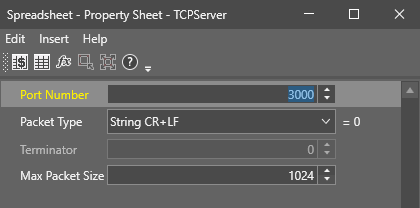
TCPServer(Port, Packet, Terminator, MaxPacketSize)
See the table for a description of the available parameters.
| Parameter | Description | ||||||||||||
|---|---|---|---|---|---|---|---|---|---|---|---|---|---|
| Port Number |
Specifies the port number at which the TCPServer receives connections from TCP/IP devices. The port number is an unsigned 16 bit port number. 0 is not a valid port. The default port number is 3000. Note: You need to assign the port number entered here on the server.
|
||||||||||||
| Packet Type |
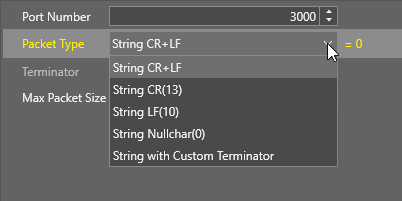
Defines the formatting of the data string communicated between TCP/IP devices.
|
||||||||||||
| Terminator | Specifies the byte value you use when you specify String with Customer Terminator, or Binary with Customer Terminator for the Packet Type. | ||||||||||||
| Max Packet Size | Specifies the maximum packet size that TCPServer can receive. If the remote sender exceeds the maximum packet size, ReadDevice shows an #ERR. |
 Outputs
| Returns |
A Device data structure. Returns #ERR if any of the input parameters are invalid. |
| Results |
When you insert the TCPServer function into a cell, a WriteDevice function is automatically inserted in the adjacent cell to the right.
|
