Printing the Calibration Pattern Using the Print Grid Dialog
The Calibration Grid utility is for printing out a calibration grid to assist in calibrating between pixel and real-world coordinates.
Note: Use the Print Grid functionality only in situations of coarse
measurements and experimentation, and not in applications that require
a high degree of precision and accuracy (a precisely fabricated calibration
pattern is required for those types of applications).
To print a calibration grid, do the following:
- Open the In-Sight Vision Suite.
-
Click the Calibration Grid button.
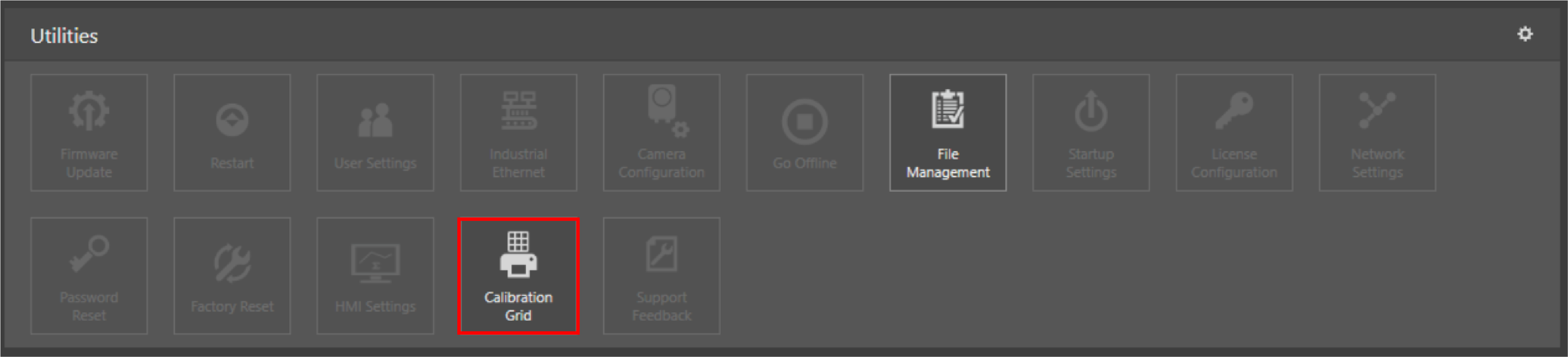
-
Set the values for the grid.
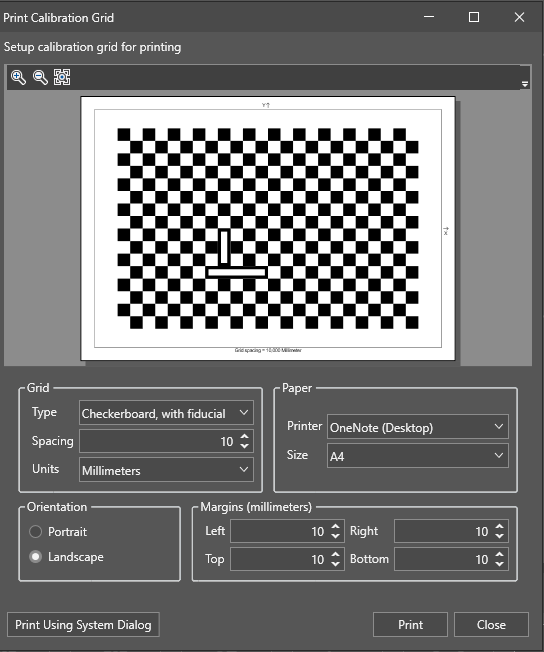
-
Grid Type: you can choose between the following types of grids:
- Checkerboard, with fiducial
- Checkerboard, no fiducial
-
Dots, with fiducial
-
Dots, no fiducial
- Grid Spacing: you can choose the size of the grid. The default value is 10.
- Grid Units: you can choose the measurement unit for the grid. The default is millimeters.
-
-
Click the Print button.
- Place the printed grid in front of the vision system.