Set Region
Sets an edit region control contained in a cell. The edit region control is always an EditRegion function Functions are tools that are available in Spreadsheet for processing and analyzing acquisitions or other results. You can add functions to your Spreadsheet job to create tool chains and produce results for specific applications..
Set Region Inputs
Syntax: SR<
| Parameter | Description |
|---|---|
|
|
The published name of the cell. |
| Space |
A blank space to separate the value from the next value. |
| Row | The X-offset of the origin, in image coordinates. |
| Space |
A blank space to separate the value from the next value. |
| Col | The Y-offset of the origin, in image coordinates. |
| Space |
A blank space to separate the value from the next value. |
| High |
The dimension along the X-axis of the region. |
| Space |
A blank space to separate the value from the next value. |
| Wide |
The dimension along the Y-axis of the region. |
| Space |
A blank space to separate the value from the next value. |
| Angle |
The orientation in image coordinates. |
| Space |
A blank space to separate the value from the next value. |
|
Curve |
The curvature of the region. |
Set Region Outputs
Returns a status code. The status codes are:
| Status Codes | Description |
|---|---|
| 1 |
The command was executed successfully. |
| 0 |
Unrecognized command. |
| -1 |
The ID is invalid. |
| -2 |
The command could not be executed because the specified cell does not contain an edit region control, or the edit region control was not created by the EditRegion function. |
| -4 |
Wrong argument type. |
| -6 |
User does not have Full Access to execute the command. |
Set Region Example
You can set the Region of an EasyBuilder Location or Inspection Tool by sending a Set Region command containing the position, dimensions, orientation, and shape of the new region.
-
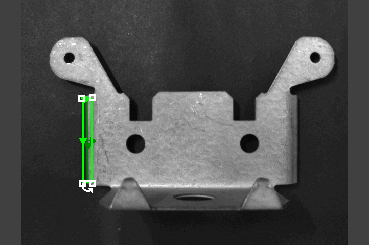
Assume that your job A job is a user-configured program in In-Sight EasyBuilder consisting of functions and designed for specific applications. You can create and edit jobs using the In-Sight EasyBuilder interface, and load them on a vision system for deployment in a live environment. contains an Edge Location Tool, and the region of the tool is currently in another position, with different dimensions, orientation, and shape.
-
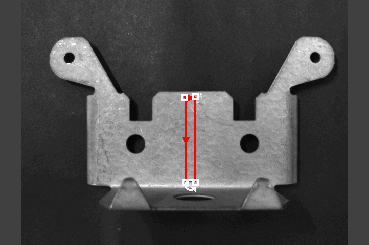
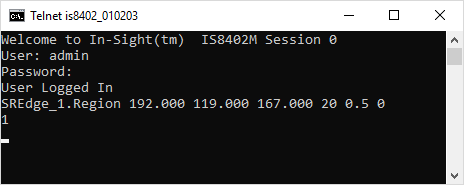
To move and re-orient the region settings of the tool through the Set Region Native Mode command, issue the command SREdge_1.Region 192.000 119.000 167.000 20 0.5 0:
-
The In-Sight vision system responds with 1,indicating that the command executed successfully.