Set Online
Sets the vision system into Online or Offline mode.
- This command cannot place the vision system into Online mode if the vision system has been set Offline either manually in the In-Sight user interface, or by a Discrete Input signal.
- The In-Sight EasyBuilder sends Set Online commands to vision systems to perform administrative functions such as Backup and Restore.
Set Online Inputs
Syntax: SO<Int>
|
Parameter |
Description |
|---|---|
|
Int |
|
Set Online Outputs
Returns a status code. The status codes are:
| Status Codes | Description |
|---|---|
| 1 |
The command was executed successfully. |
| 0 |
Unrecognized command. |
| -1 |
The value given for Int is either out of range, or is not a valid integer. |
| -2 |
The command could not be executed. |
| -5 |
The communications flag was successful, but the vision system did not go Online because the vision system is set Offline manually through the In-Sight user interface or by a Discrete I/O signal. |
| -6 |
User does not have Full Access to execute the command. |
Example: Set the In-Sight Vision System Into Online Mode
To set the In-Sight vision system into Online mode, issue the following command: SO1
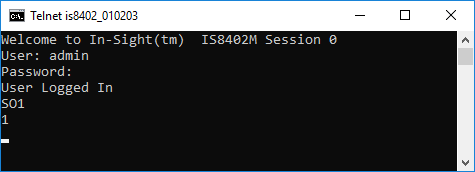
The vision system responds with a status code of 1, indicating that the vision system was successfully placed Online.
Example: Set the In-Sight Vision System into Offline Mode
To set the In-Sight vision system into Offline mode, issue the following command: SO0
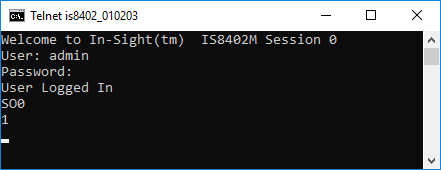
The vision system responds with a status code of 1, indicating that the vision system was successfully taken Offline.