Set Event
Triggers a specified event in the
-
If you configure the In-Sight vision system to accept an acquisition Acquisition is the process or result of the vision system acquiring a new image. trigger from a PLC A Programmable Logic Controller is a ruggedized computer that you can use for automating processes or even an entire production line./Motion Controller through a Native Mode command, use the SetEvent and Wait function Functions are tools that are available in Spreadsheet for processing and analyzing acquisitions or other results. You can add functions to your Spreadsheet job to create tool chains and produce results for specific applications. with the Event code set to 8 (SW8). This ensures that the vision system waits for both the acquisition and inspection to complete before sending a complete response back to the PLC/Motion Controller, and that previous inspection results are not being sent to the PLC/Motion Controller. You can also use the complete response from the vision system to create conditional PLC logic that sends a read request for the inspection results. For more information, see Set Event and Wait.
-
If a PLC/Motion Controller uses the Set Event function to trigger an acquisition, the only way to use it is in cases where the inspection results are not also being read. Otherwise, the acquisition and the inspection are not in sync, with the vision system returning a response as soon as the image is acquired and before the inspection completes.
Set Event Inputs
Syntax: SE<Int>
|
Parameter |
Description |
|---|---|
|
Int |
The Event code to set.
|
Set Event Outputs
| Status Codes | Description |
|---|---|
| 1 | The command execution is successful. |
| 0 | Unrecognized command. |
| -1 | The number is either out of range (0 to 8) or not an integer. |
| -2 | The command execution is unsuccessful. |
| -6 | User does not have Full Access to execute the command. |
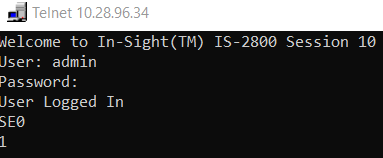
Set Event Example
You can use the SetEvent function to trigger events in the
The command to trigger External Event 0 is: SE0