Importing the GSD File into the Catalog
The In-Sight vision system appears in the Catalog only if its GSD file is installed. You only need to perform the installation once, when the vision system is configured on the PLC A Programmable Logic Controller is a ruggedized computer that you can use for automating processes or even an entire production line. the first time.
To install the GSD file for the vision system, follow the below steps:
-
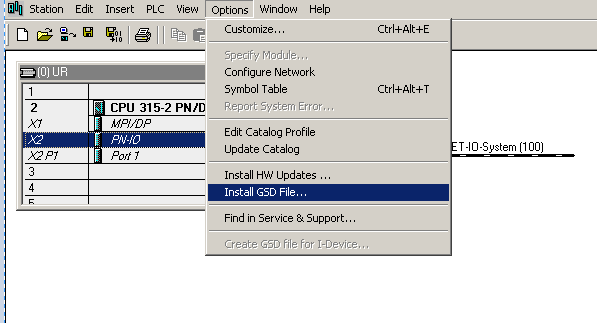
Click on the Options menu, and then on the Install GSD File option.
Browse the following folder containing the GSD file
C:\Program Files\Cognex\In-Sight\In-Sight Vision Suite Editors\In-Sight\In-Sight 25.2.0\FFP\GSD\
-
Click Select All, then click Install.