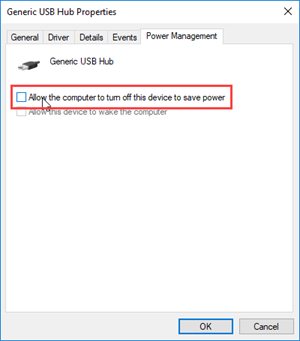
Disable Turning Off the USB Hub
Perform the following steps to prevent Windows from turning off the USB hub that the Cognex Security Dongle is plugged into.
Tip: If your computer has multiple USB hubs listed in the Universal Serial Bus controllers node of the Device Manager, perform the steps below for all of them.
-
Open the Windows Device Manager.
Tip: The quickest way to do this is using the Search button, and typing Device Manager. -
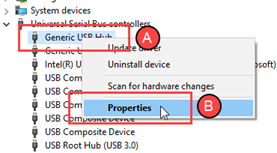
Expand the Universal Serial Bus controllers node (A), and right-click on the USB hub you are using. Click the Properties option (B).
-
Click the Power Management tab of the dialog that opens, and uncheck the Allow the computer to turn off this device to save power option. Then, click OK to apply the change.