Importing the GSD File into the Catalog
The In-Sight vision system appears in the Catalog only if its GSD file is installed. This must be performed only once, when the vision system is configured on the PLC the first time.
To install the GSD file for the In-Sight vision system, follow the below steps:
-
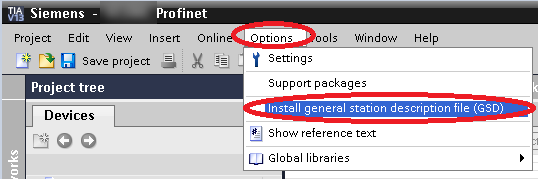
Click on the Options menu, and then on the Install general station description file (GSD) option.
-
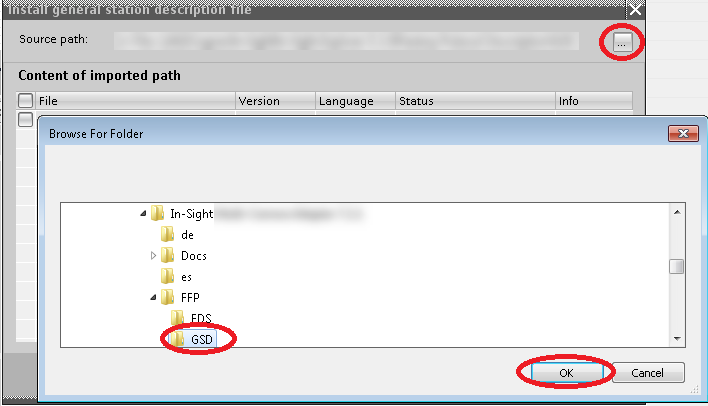
Browse the folder containing the GSD file:
-
In case of using an In-Sight D900 series vision system, the GSD file is located here:
C:\Program Files\Cognex\In-Sight\In-Sight Vision Suite Adapters\In-Sight ViDi 1.4.0\FFP\In-Sight D9xx\GSD
-
In case of using an In-Sight ViDi PC device, the GSD file is located here:
C:\Program Files\Cognex\In-Sight\In-Sight Vision Suite Adapters\In-Sight ViDi 1.4.0\FFP\In-Sight ViDi PC\GSD
-
-
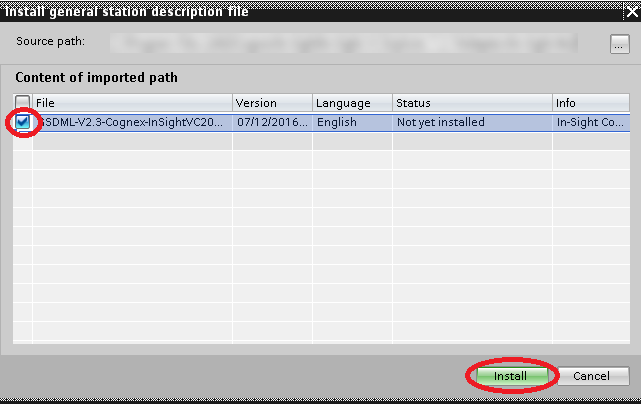
Tick the box in front of the GSDML file, then click on Install.