In-Sight ViDi Runtime Job
The In-Sight ViDi runtime job is a light-weight version of the job that was used to generate the trained neural network model of the associated ViDi functions for that application. The runtime job only contains the ViDi functions as a trained network model, and does not contain the training data (including the training images), so therefore cannot be retrained. Each ViDi function included in the runtime job will not have access to the ViDi Editor, and the ViDi tools contained in the functions cannot be retrained.
This means that the runtime job is a much smaller file size than a training job, which helps to facilitate faster load and transfer speeds between systems and at startup.
Once you have developed your job and you are ready to place the job online within its active deployment environment, you will want to create a runtime workspace of your trained ViDi tools. The runtime workspace is also referred to as "inference-only operation". Inference refers to the implementation of the ViDi tools in their runtime state, where they can process images, and the Processing Tool Parameters can be modified, but the tools cannot be retrained.
- When developing In-Sight ViDi job files, Cognex recommends instituting a version control system for your job files. This will allow you to save and start job files from known states.
- The runtime only job does not require a valid In-Sight ViDi training license.
- The runtime only job also allows for the protection of IP associated with the trained neural network model, since the training data is not included with the job. This allows the runtime job to be shared without compromising the training data.
- If you determine that you will need to retrain the ViDi tools, you will need to reload the training job on your development PC and retrain the tools. Then you will need to repeat the steps below.
-
After you have created your inference-only job, you can create cell templates that contain the inference-only versions of the ViDi function(s). You can then pass the inference-only ViDi functions into other job files. For more information on generating a cell template, refer to the Templates topics.
When using a cell template of a ViDi function, if you determine that you need to retrain the ViDi tools contained in the function, you will need to go back to the original training job file, and repeat the process of generating the inference-only job and cell templates.
-
In addition to inference-only cell templates, you can also create a recipe containing an inference-only ViDi function. You can then load the inference-only ViDi function via the Recipe Manager. For more information on creating and using recipes, refer to the Recipe Manager topics.
Similarly to the cell template, if you determine that you need to retrain the ViDi tools contained in the function, you will need to go back to the original training job file, and repeat the process of generating the inference-only job and recipes.
-
After you have trained and tested your ViDi tools and are ready to place them in their application environment, from the File menu, select Export Runtime Job.
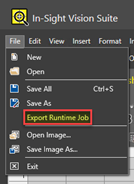
- This will launch the Save As dialog.
-
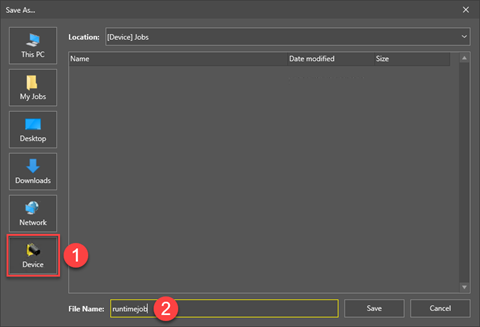
Select Device and save the runtime job on the selected In-Sight D900 series vision system.
-
The inference-only runtime job will now be stored on the vision system.
Tip: The vision system can be configured to automatically load the job file and go online at startup by configuring the Startup Settings utility of In-Sight Vision Suite.