OCV/OCR
The OCV/OCR tools read and verify text strings using trained fonts. The OCV/OCR tools includes the following functions:
- OCRMax: Trains, reads and verifies characters in text strings.
- OCRMaxSettings: Provides programmatic access to segmentation parameters and other advanced text reading parameters.
OCV/OCR Overview
In-Sight Explorer provides two different methods for Optical Character Verification (OCV) and Optical Character Recognition (OCR) for inspecting alphanumeric text strings in an image: the OCRMax and OCRMaxSettings functions.
OCRMax and OCRMaxSettings Functions
The OCRMax function performs OCR through a process of segmentation and classification. Segmentation occurs first and uses threshold techniques to identify the areas of the image that appear to contain lines of text. After the text has been segmented into characters, the characters are trained and stored as a font database. Classification occurs during run-time, and is responsible for reading any text found after the function performs segmentation. This is done by comparing the images of the segmented characters against the trained characters in the font.
Segmentation
During the segmentation process, the OCRMax function determines the location of the line of text within the ROI, and calculates the text's angle, skew and polarity. The region is then normalized to remove unwanted noise before being binarized into foreground and background pixels. Within the binarized image, blob analysis is performed to produce character fragments, with each character fragment representing a single blob. The character fragments are then grouped together to form characters, and the characters are assigned a character rectangle.
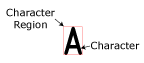

The line of text within the ROI is split into images of the individual characters, and each character is enclosed within a non-editable character rectangle. The ROI defines the approximate location, angle and skew of the line of text. The Angle Range and Skew Range parameters on the Segmentation tab can be used to compensate for variations, if necessary.
Classification
Once segmentation has been completed, and the characters have been trained into a font database, classification of characters in run-time images begins. Classification takes segmented character images as an input and determines the corresponding letter. By classifying all of the segmented character images in a line of text, the entire string for the whole line of text is returned.

Classification occurs after training, where the individual characters are assigned a title based on either a string of entered characters, or user-assigned values. Once a collection of characters has been trained and grouped into a font, classification involves comparing run-time images against the characters in the font and returning the best-match character, and the score for that best-match character.
Each character is trained from one or more examples of the characters to be classified. The characters are grouped together into a font, that is stored within the OCRMax function’s OCRMax data structure. The font includes all of the trained characters; each character is composed of its name and an image of its character rectangle and the information within it (e.g. the ink of the text).