I/O Module Cable Specifications
The I/O Module cable is used with the CIO-1400 I/O expansion module. The I/O Module cable connects the vision sensor directly to the I/O module via the DB15 connector. When the I/O module is used, all power and communication lines used by the vision sensor are connected using the I/O Module cable.
|
|
||||
|---|---|---|---|---|
| P1 Pin# | Signal Name | Wire Color | Signal Name | P2 Pin# |
| 1 | HSOUT 2 | Yellow | Not Used | Not Used |
| 2 | RS-232 Tx | White/Yellow | RS-232 Rx | 7 |
| 3 | RS-232 Rx | Brown | RS-232 Tx | 6 |
| 4 | HSOUT 3 | White/Brown | Not Used | Not Used |
| 5 | IN 0 | Violet | Not Used | Not Used |
| 6 | INPUT COMMON | White/Violet | TRIGGER- | 3 |
| 7 | +24VDC1 | Red | +24VDC | 1 |
| 8 | GND1 | Black | -24VDC | 8 |
| 9 | OUTPUT COMMON | Green | -24VDC | 8 |
| 10 | TRIGGER | Orange | TRIGGER+ | 2 |
| 11 | HSOUT 0 | Blue | HSOUT 0 | 4 |
| 12 | HSOUT 1 | Grey | HSOUT 1 | 5 |
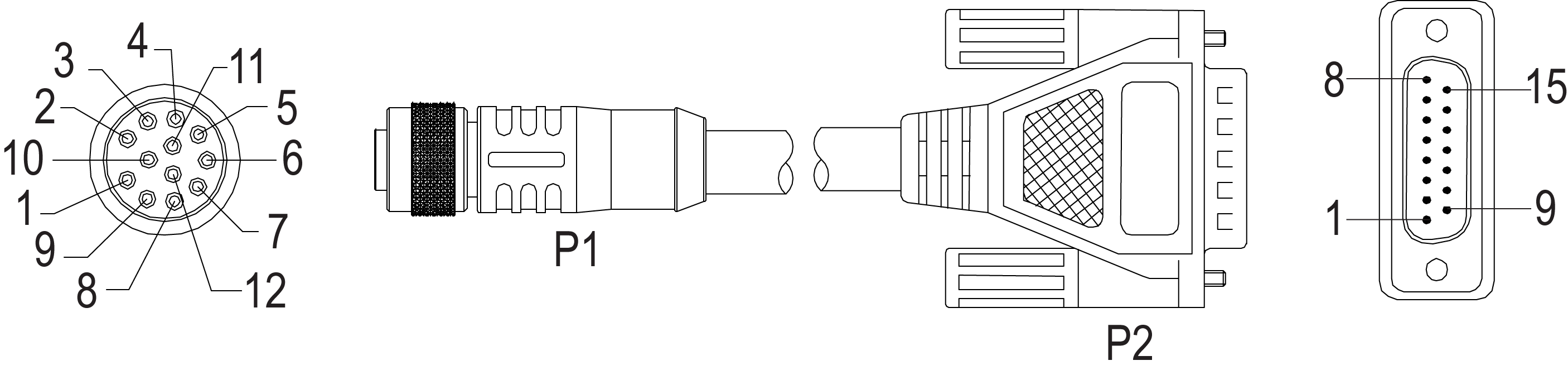
Note:
- Cables are sold separately.
- The CIO-1400 I/O expansion module supports In-Sight 2000 series vision sensors with firmware version 5.3.0 and higher.