What is Blob Analysis?
The In-Sight Blob Tool performs a type of blob analysis that is referred to as connectivity analysis, and this step is accomplished by using the DetectBlobs or ExtractBlobs function. When the DetectBlobs or ExtractBlobs function is inserted into the spreadsheet and its parameters configured, the function will begin performing the analysis by first segmenting the ROI.
During this process, the pixels in the ROI are divided into two categories, Blob and Background, based upon the greyscale threshold value. This threshold value separates the pixels so that those pixels below the threshold value are categorized as Black, and those values over the threshold are categorized as White.
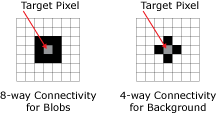
As this process is being performed, the pixels are examined to determine whether or not they are connected to their neighboring pixels. A Blob pixel is said to be connected to neighboring pixels if the Blob pixel touches another pixel of similar value to either side, above it, below it or diagonally to it. A Background pixel is said to be connected to neighboring pixels if the Background pixel touches another pixel of similar value to either side, above it or below it.
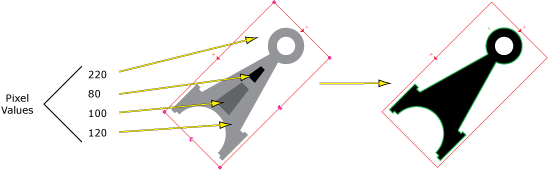
The figure below demonstrates how the In-Sight Blob Tool analyzes an image. In this example, a greyscale threshold value of 150 is used to segment the image into Blob and Background pixels. All pixels with greyscale values greater than or equal to 150 are categorized as White, or Background, pixels; while all pixels with values less than 150 are categorized as Black, or Blob, pixels:
Once the blob has been extracted from the image, DetectBlobs or ExtractBlobs will automatically create a Blobs data structure and a result table that contains the data about the extracted blob. The information returned can be utilized by the FindBlobs and SortBlobs functions to filter and sort through other found blobs, based upon their physical characteristics and location, respectively.
The FindBlobs function analyzes the blobs within a ROI and determines whether or not the found blobs match the specified requirements; those blobs that meet the requirements will be returned, and scored in terms of how closely they match the requirements, in descending order.
The SortBlobs function analyzes the blobs within a ROI and determines where the blob is located in relation to a fixture; this is helpful in determining a blob's position relative to another blob, and a single DetectBlobs or ExtractBlobs function can be used to find many blobs in a ROI at once.