SetFavorHostTable
Enables or disables the Favor Host Table over DNS option found in the In-Sight Host Table. For more information, see Host Table Dialog.
SetFavorHostTable Inputs
Syntax: EV SetFavorHostTable(FavorHostTable)
|
Parameter |
Description |
|---|---|
|
FavorHostTable |
0 = Disabled (default) 1 = Enabled |
SetFavorHostTable Outputs
Returns a status code, followed by the number of characters (in bytes) for the results, then the results in XML format. The status codes are:
| Status Codes | Description |
|---|---|
| 1 | The command was executed successfully. |
| 0 | Unrecognized command. |
| -2 | The command could not be executed. |
| -6 | User does not have Full
Access to execute the command. |
SetFavorHostTable Example
To enable the Favor Host Table over DNS option, issue the following command: EV SetFavorHostTable(1)
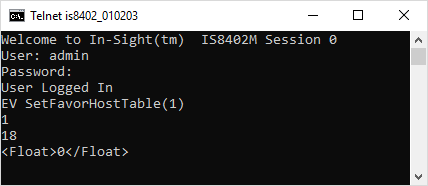
After issuing the SetFavorHostTable command, the In-Sight sensor responds with a status code (1), followed by the number of characters, in bytes (18). Finally, the results in XML format.