SetDeEnergizeOutputs
Configures the De-Energize Outputs While Offline setting found in the Discrete I/O Settings dialog.
Note: If the De-Energize Outputs While Offline checkbox is checked and the CIO-MICRO or CIO-MICRO-CC I/O module has an output line configured as a LifeLine signal type, the line will remain HIGH when the connected vision system is placed Offline.
SetDeEnergizeOutputs Inputs
Syntax: EV SetDeEnergizeOutputs(DeEnergizeOutputs,WriteProcSet)
| Parameter | Description |
|---|---|
| DeEnergizeOutputs |
|
|
WriteProcSet |
|
SetDeEnergizeOutputs Outputs
Returns a status code, followed by the number of characters (in bytes) for the results, then the results in XML format. The status codes are:
| Status Codes | Description |
|---|---|
| 1 | The command was executed successfully. |
| 0 | Unrecognized command. |
| -2 | The command could not be executed. |
| -6 | User does not have Full
Access to execute the command. |
SetDeEnergizeOutputs Example
To configure the sensor to de-energize outputs when placed Offline, issue the following command: EV SetDeEnergizeOutputs(1,1)
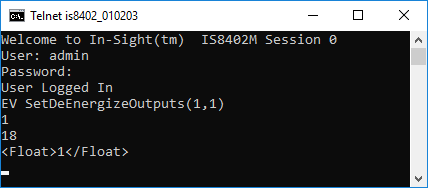
The In-Sight sensor responds with a status code (1), followed by the number of characters, in bytes (18). Finally, the value (1) is returned.