GetCellName
Returns the cell location of a specified symbolic tag name, or the symbolic tag name of a specified cell.
GetCellName Inputs
Syntax: EV GetCellName("Name")
| Parameter | Description |
|---|---|
| "Name" | The name of the symbolic tag (such as Distance_1.Distance, for example) or the cell location (A4, for example). The name must be enclosed in quotation marks. |
GetCellName Outputs
Returns a status code, followed by the number of characters, and the name or cell reference of the cell. The status codes are:
| Status Codes | Description |
|---|---|
| 1 |
The command was executed successfully. |
| 0 |
Unrecognized command. |
| -1 |
The cell ID is invalid. |
| -2 |
The command could not be executed. |
| -6 |
User does not have Full Access to execute the command. For more information, see User Access Settings Dialog. |
Example: Symbolic Tag Name
To get the symbolic tag name of cell B116, issue the following command: EV GetCellName("B116")
Issuing this command produces the following result:
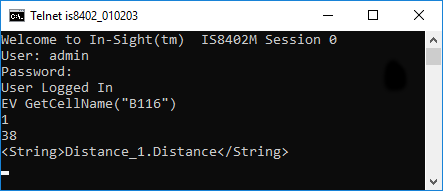
The In-Sight sensor returns 1 to indicate that the command was executed successfully; the number of characters (in bytes) is followed by the Symbolic Tag name.
Example: Symbolic Tag Name Cell Location
To get the cell location of a symbolically tagged Distance Measurement Tool result, issue the following command: EV GetCellName("Distance_1.Distance")
Issuing this command produces the following result:
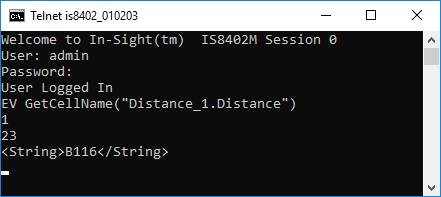
The In-Sight sensor returns 1 to indicate that the command was executed successfully. The number of characters (in bytes) is followed by the cell location.