Light Cable Specifications
The Light cable is used to connect the vision system to an external lighting device, providing power and strobe control. The vision system can be connected to either a continuous lighting device or a strobed lighting device. Before using a lighting device, you must use the Light Settings dialog within In-Sight Explorer to configure the light settings for either a PNP or NPN configuration, depending on the light vendor. For more information, refer to the Light Settings topic in the In‑Sight® Explorer Help file.
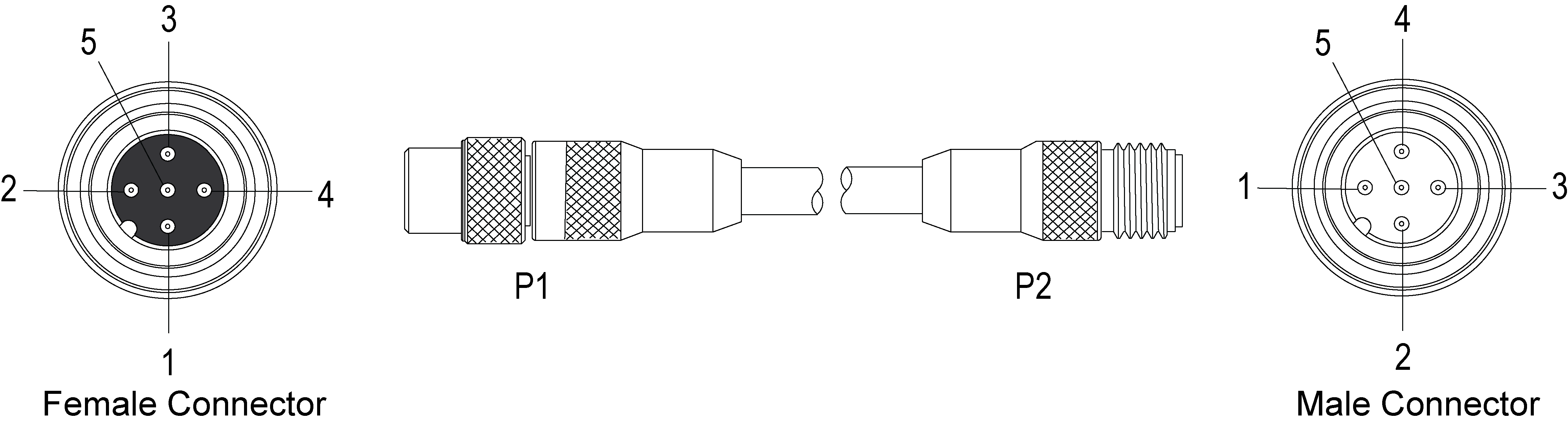
|
||
|---|---|---|
| Pin# | Signal Name | Wire Color |
| 1 | LIGHT POWER1 | Brown |
| 2 | RESERVED | White |
| 3 | 24V COMMON | Blue |
| 4 | STROBE2 | Black |
| 5 | RESERVED | Grey |
Note: Cables are sold separately.