Trigger Multiple Acquisitions Using Timestamps
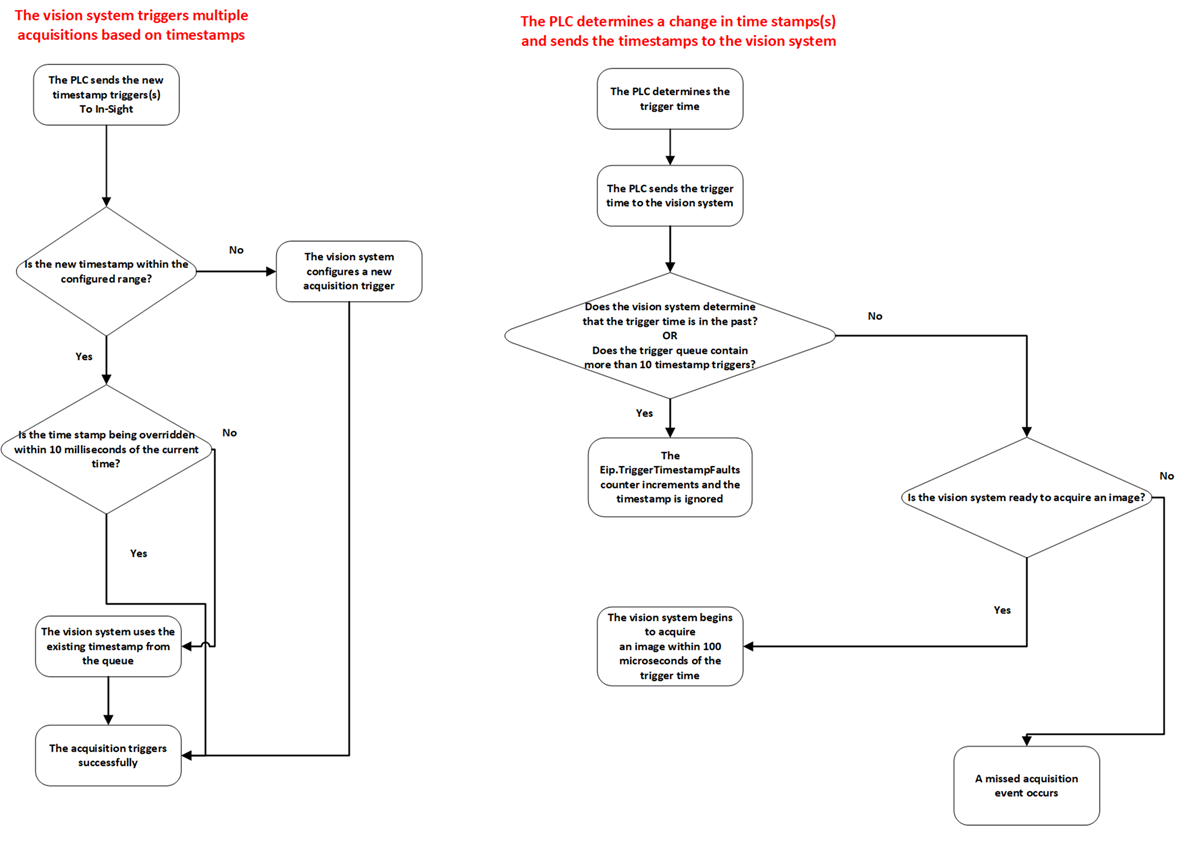
You can use timestamps to schedule when to trigger multiple acquisitions. It accomplishes the following:
- The vision system can respond to a PLC trigger (over an EtherNet/IP connection) within 10 milliseconds of the actual trigger time sent by the PLC.
- The timestamps can match the vision inspection with the part that was in view of the vision system during acquisition.
This feature implements the IEEE 1588 Precision Time Protocol (PTP) to manage the synchronization of local clocks to the master clock.
The following figure shows the timestamp trigger scenarios:
If you have been using single timestamp triggering in In-Sight 4.x.x and want to continue using it with your existing PLC logic (if migrating to a vision system running 5.6.1 firmware or later,), you have to set the "Eip.TriggerTimestampLegacyMode" command. This command is part of SetSystemConfig. If you want to use the single/multiple timestamp triggering implemented in firmware version 5.6.1, you don't have to change the setting.