Telnet Port
Configures the Telnet Port settings that are found in the Network Settings dialog. For more information, see Network Settings Dialog.
Inputs
Syntax: EV SetSystemConfig("TelnetPort",Port,WriteProcSet)
|
Parameter |
Description |
|---|---|
|
References the Telnet Port Settings. |
|
|
1 to 65535, 23 (default) |
|
|
1 = Settings are saved in the proc.set file. The settings persist after the In-Sight vision system/sensor is power cycled. |
- A valid port assignment is any unused number between 1 and 65535, excluding 21, 68, 80, 502, 1069, 1070, 1212, 2222, 44818 and 50000 (reserved for In-Sight communications). For more information, see In-Sight Ports.
- The vision system must be rebooted before the Telnet Port settings take effect.
Outputs
Returns a status code, followed by the number of characters (in bytes) for the results, then the results in XML format. The status codes are:
| Status Codes | Description |
|---|---|
| 1 | The command was executed successfully. |
| 0 | Unrecognized command. |
| -2 | The command could not be executed. |
| -6 | User does not have Full
Access to execute the command. |
Example
To specify a Telnet Port of 2000, issue the following command: EV SetSystemConfig("TelnetPort",2000,1)
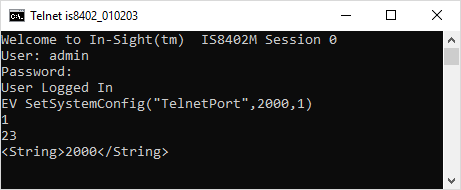
The In-Sight vision system responds with a status code (1), followed by the number of characters, in bytes (23). Finally, the Telnet Port setting (2000) is returned.