 Pixel Count Presence/Absence Tool - Settings Tab
 Threshold Mode
Defines the mode for determining the grayscale value that segments the region of the image into black and white pixels. When Auto is selected (default = Auto) , the tool will create a default "Smart Setting" based on your image, each time an image is acquired, constantly adjusting for changes in brightness from image to image. When Manual is selected, you manually enter and adjust the two threshold values.
Low Threshold
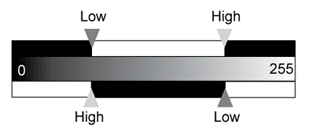
Defines the grayscale value that separates black pixels from white pixels (0 - 255, when enabled). If the High Threshold value is ≥ the Low Threshold value, white pixels are defined as Low Threshold ≤ value ≤ High Threshold; if High Threshold < Low Threshold, white pixels are defined as value ≤ High Threshold or Low Threshold ≤ value. This control is Off by default, and requires that the Threshold Mode be set to Manual to be enabled. Use the graph in the Histogram tab to set an optimal value for your application.
|
|
High Threshold
Defines the grayscale value that separates black pixels from white pixels (0 - 255, when enabled). If the High Threshold value is ≥ the Low Threshold value, white pixels are defined as Low Threshold ≤ value ≤ High Threshold; if High Threshold < Low Threshold, white pixels are defined as value ≤ High Threshold or Low Threshold ≤ value. This control is Off by default, and requires that the Threshold Mode be set to Manual to be enabled. Use the graph in the Histogram tab to set an optimal value for your application.
|
|
|
Polarity
Defines the color of the pixels to count – Black or White (default = White).