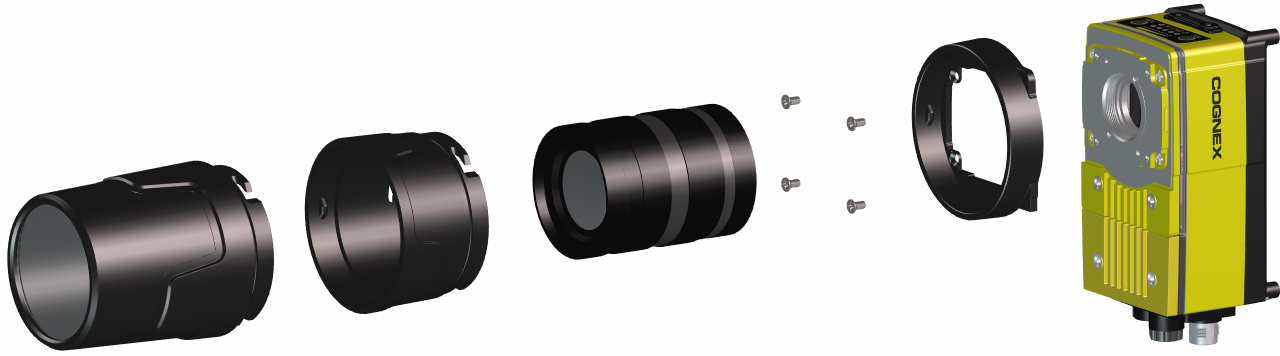
Install the C-Mount Lens and Cover (COV-7000-CMNT-LG)
Complete the following steps to install a C-Mount lens and cover to the vision system. The C-Mount cover (COV-7000-CMNT-LG) is an optional accessory and required for IP67 protection.
Note:
- For the In-Sight 9902L vision system, the C-Mount lens has the following restrictions:
- Maximum thread length is 5.25mm.
- The C-Mount lens threads and body cannot protrude more than 6.5mm in length into the vision system when screwed in, unless the diameter of the back lens is smaller than 19.25mm. If the C-Mount lens threads and body protrude more than 6.5mm, you can add a spacer between the lens and vision system. However, the spacer decreases the working distance.
- If using the COV-7000-CMNT-LG cover
- Remove the rubber faceplate covering the image sensor window, if present.
- Remove the protective film covering the threaded lens opening, if present.
- Place the adapter on the faceplate of the vision system. Insert the four adapter screws and tighten; the maximum torque is 0.90 Nm (8 in-lb).
- Thread the lens into the vision system.
- (Optional) For longer lenses, the C-Mount cover extender accessory (COV-7000-CMNT-LGX) can be used to add 30mm in length to the C-Mount cover. If using the cover extender, attach it to the vision system and rotate the cover extender clockwise approximately thirteen degrees to lock it.
-
Attach the cover to the vision system. Rotate the cover clockwise approximately thirteen degrees to lock it.