Edit Region in Web HMI
-
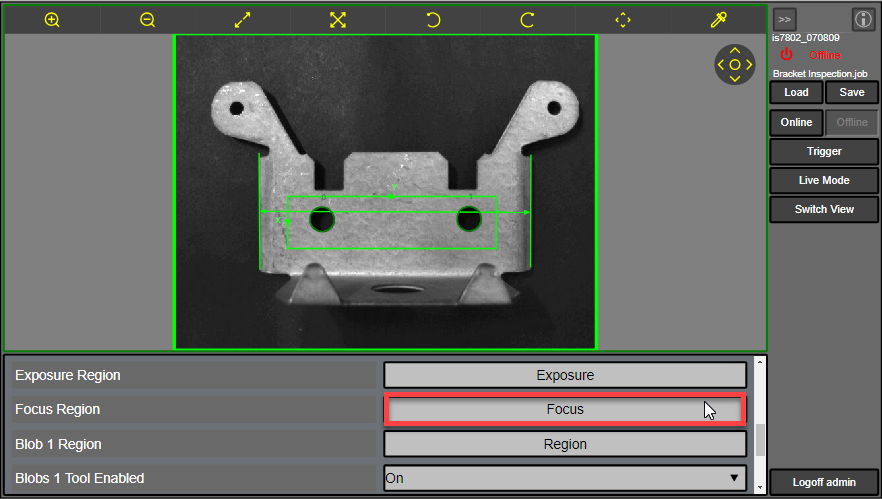
To edit region in the Web HMI Display, click an interactive graphics control button in the EasyView Pane. For more information, see Interactive Graphics Mode.
-
To modify the interactive graphics, select the appropriate handle to make it active. The active handle is displayed in yellow. Then, drag the handle to a new position.
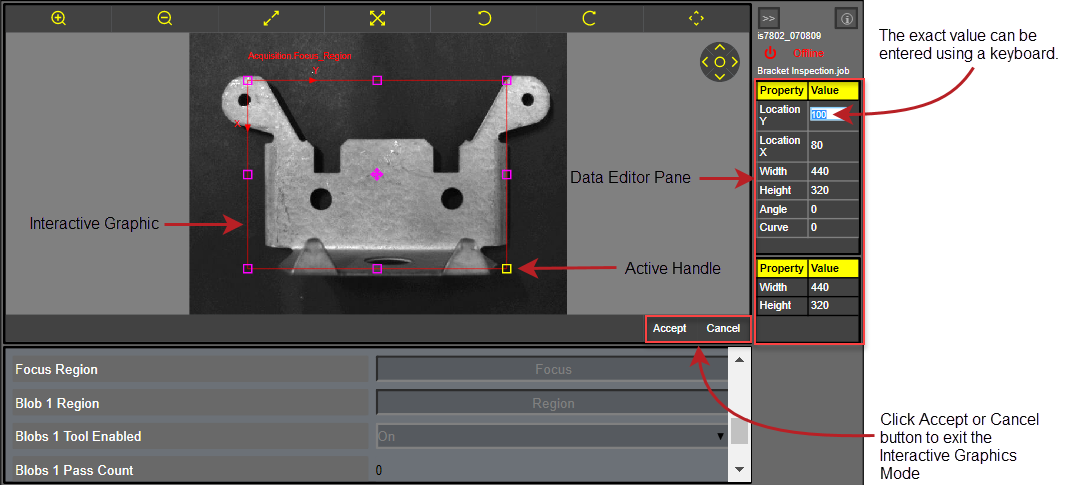
The Data Editor pane displays the current position, size, rotation or bend of the active handle. You can also manually enter the value for the active handle by double-clicking the value box to modify the interactive graphic.
Note:- For more information about how to use the interactive graphics, see the Interactive Graphics Mode.
- The types of handles available depend on the interactive graphics control button being modified and whether the handle was enabled when initially configured in In-Sight Explorer.
- To accept the changes and exit the Interactive Graphics Mode, click Accept. To cancel the changes and exit the Interactive Graphics Mode, click Cancel.