 Min/Max Points Measurement Tool - Fit Tab
When the Fit tab is selected, the tool will display all of the found edge candidates within the region and the best-fit line or circle result. The edge candidates represent the possible edges to be considered when constructing the best-fit line or circle, and edge candidates are indicated by small circles.
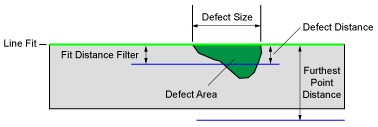
 Line Fit
Defines what type of best-fit line (None, Straight Line Fit, Circle Line Fit, Auto Fit or Region; default = Auto Fit) will be constructed out of the found edges.
- When None is selected, the tool will not create a best-fit line, and the position of found edges will be measured relative to the center of the region.
- When Straight Line Fit is selected, the tool will create a straight best-fit line from the detected edges, and the position of found edges will be measured relative to the best-fit line.
- When Circle Line Fit is selected, the tool will create a circular best-fit line from the detected edges, and the position of found edges will be measured relative to the best-fit line.
- When Auto Fit is selected, the tool will automatically create either a straight or circular best-fit line from the detected edges, and the position of found edges will be measured relative to the best-fit line.
- When Region is selected, the tool will automatically create either a straight or circular best-fit line from the detected edges, and the position of found edges will be measured relative to the side of the region.
Filter Outliers
Defines whether or not the tool will remove points from the best-fit line that are further than the distance defined by the Fit Distance Filter parameter (by default, this parameter is disabled).
Fit Distance Filter
Defines the distance (1 - 1920; default = 2), in pixels, from which an edge must be from the original best-fit line to be utilized in a re-fit calculation. This parameter is helpful in preventing defects from affecting the line fit.
Furthest Point Filter Distance
Defines the outlier distance (1 - 1920; default = 1000) beyond which edges are not used to determine the minimum and maximum distances; any edge which is greater than this value will be ignored.
Re-Score
Defines whether or not the detected edges will be re-scored to ensure that detected edges that were initially discarded were filtered correctly (by default, this parameter is enabled).
Re-Fit
Defines whether or not the tool will re-fit the best-fit line after the edges have been re-scored (by default, this parameter is enabled).
Result
Displays the best-fit line in the image and reports the location of the closest and furthest points from the best-fit line.