Trigger Over EtherNet/IP
To configure the In-Sight 2000 vision sensor for triggering over EtherNet/IP:
- Log on to the vision sensor.
- In the Set Up Image step, set the Trigger Type to Industrial Ethernet.
-
In the Communication step:
- In the Communications group box, press the Add Device button.
- In the Device Setup group box, from the Device drop-down list, select PLC/Motion Controller.
- From the Manufacturer drop-down list, select the PLC/MC manufacturer. If your PLC/MC manufacturer is not listed, choose Other.
- From the Protocol drop-down list, select your communication protocol. The communication protocols listed are contingent upon the Manufacturer selection.
- Press the OK button.
-
Place the In-Sight vision sensor Online.
-
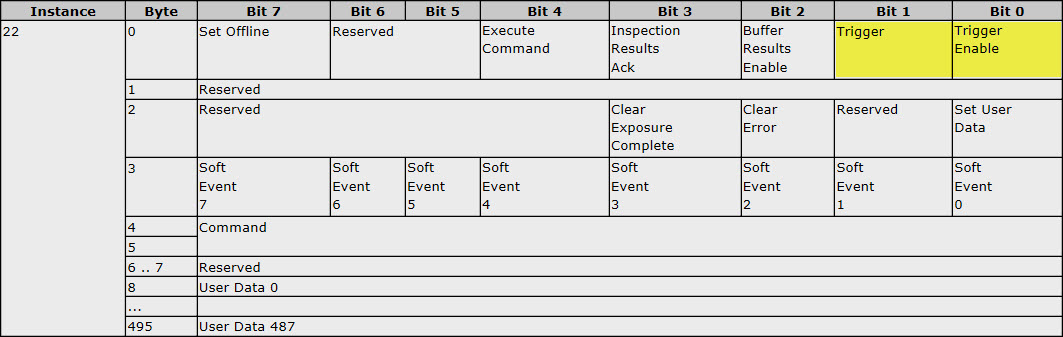
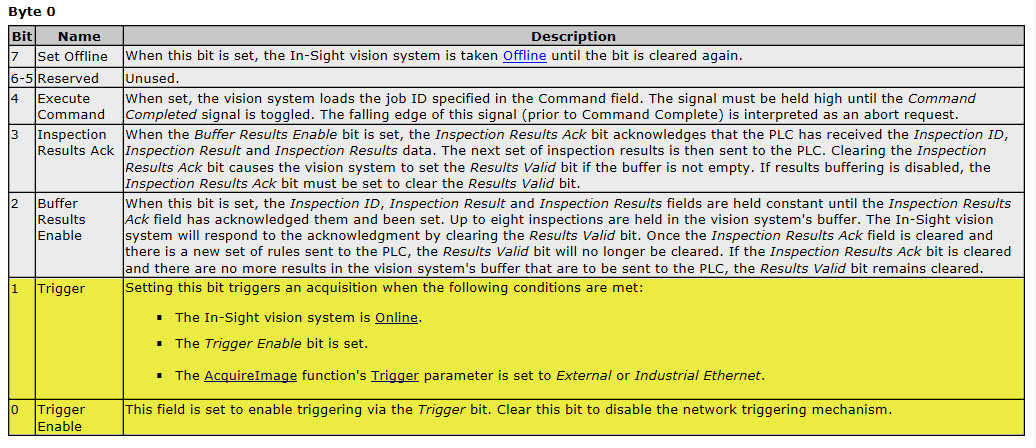
In the I/O assembly tags on the PLC, set the Trigger Enable bit high, and then set the Trigger bit high to trigger (referenced bits are highlighted in yellow).