WriteFTP
Writes a data file or appends a data string to a file. This function is typically used to log data results that can be viewed in a file.
- The WriteFTP function requires the In-Sight vision system to be Online.
- Jobs containing this function that are saved in In-Sight Explorer 3.3.0 or higher are only compatible with In-Sight Explorer 3.3.0 and higher.
- The port number of the FTP server connection can be changed by appending the host name (or IP address) with a colon (:) then the new port number. For example, if the current Host Name was PRODUCTION1, to change the port number from the default (port 21) to port 34, the Host Name parameter would be specified as PRODUCTION1:34.
- When using the In-Sight emulator as an FTP Server, by default, files are written to the Emulator folder (C:\ProgramData\Cognex\In-Sight\Emulators\x.x.x). In addition to this directory, files can be written to a user-defined location (Authorized FTP directory). For more information on the Emulator directory and the Authorized FTP directory, see Emulation Panel.
WriteFTP Inputs
Syntax: WriteFTP(Event,Host Name,User Name,Password,File Name,Data Format,String,Append)
| Parameter | Description | ||||||||
|---|---|---|---|---|---|---|---|---|---|
Specifies the event that forces an update.This parameter must be a reference to one of the following:
Note: When the default
Event reference is deleted, the value is replaced by a checkbox. If another
cell is referenced as an event, the function will conditionally run based
on the referenced cell. If the checkbox is enabled, the function will
always run when any inputs to the function are updated. |
|||||||||
|
The host name (or IP address) of the target system on the network where the file is located. The target system can be an In-Sight emulator or any other device recognized as an FTP server on the network. Note: The Host Name drop-down does not list Host Names of In-Sight vision systems and/or emulators on the network. Manually enter the host name or the IP address of the target vision system/emulator in the Host Name field.
|
|||||||||
|
A valid user name for the target system's FTP server. This user name is not required to exist on the In-Sight vision system that is writing the image file. |
|||||||||
|
A valid password for the target system's FTP server. The password is case-sensitive, and its length cannot exceed 15 characters. Note:
|
|||||||||
|
The name of the file. Long file names are supported. If no path is specified, the file will be written to the default directory of the FTP server on the target system. If the file does not exist, it will be created when the function is first executed; the default filename is "InSight". Note: When writing files to the Authorized FTP Directory, the File Name path must precisely match the specified Authorized FTP Directory path in the Option dialog. For more information, see Emulation Panel. Files can also be written to any sub-directories within the Authorized FTP Directory (the sub-directory must exist).
For example, if the Authorized FTP Directory is C:\temp and the name of the file is "InSight", the File Name must be specified as "C:\temp\InSight". If writing to a sub-directory "Jobs", the File Name will be "C:\temp\Jobs\InSight". If only specified as "InSight", the file will be written to the default Emulator directory. |
|||||||||
|
The type of file. The extension will automatically be appended to the File Name.
|
|||||||||
|
A text string or a reference to a cell containing a text string. The maximum string length is 255 characters. Note:
|
|||||||||
|
Specifies the way in which the data is written to the file.
|
WriteFTP Outputs
|
Returns |
Note:
When Data Format is set to HTML, the following are inserted into the spreadsheet after exiting the WriteFTP property sheet the first time:
When Data Format is set to TEXT, only the Stringf text string function is inserted into the spreadsheet. |
WriteFTP Examples
- In Example 1, the only parameters edited in the WriteFTP property sheet are the Host Name, User Name, and Password.
- For Example 2, the Host Name, User Name, Password, and Data Format parameters are edited.
- In Example 3, the same parameters are used from Example 1, but functions that were automatically inserted in the spreadsheet are edited, and additional functions are added.
WriteFTP Example 1:
A2 = WriteFTP($A$0,"FACTORYFLOOR-1","admin","*","InSight",1,B2,1)
B2 = Stringf("<LI><A HREF=%c%s%c>%s</A></LI>\r\n",34,D2,34,C2)
C2 = ' Test string.
D2 = GetFilename(E2)
E2 = WriteImageFTP($A$0,"FACTORYFLOOR-1","admin","*", $A$0,"InSight",999,0,0,0,1,0)
Whenever the spreadsheet updates after an image acquisition, the function appends the text string in cell C2 to the end of InSight.HTM on the host named FACTORYFLOOR-1. The User Name "admin" and its password must already exist on FACTORYFLOOR-1 or #ERR will be returned in the spreadsheet. Within the HTML file, there will be a hyperlink to the image file, InSightxxx.bmp, and the text message " Test string." contained within cell C2. Since the value for the Reset parameter of WriteImageFTP is Off, the first file written would be InSight000.bmp, the second InSight001.bmp, and so on.
 See
Example 1 functions inserted into the spreadsheet
See
Example 1 functions inserted into the spreadsheet

WriteFTP Example 2:
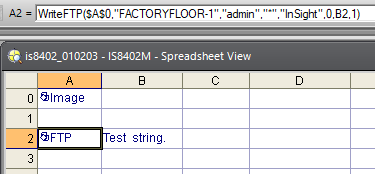
A2 = WriteFTP($A$0,"FACTORYFLOOR-1","admin","*","InSight",0,B2,1)
B2 = Stringf("Test string.\r\n")
Whenever the spreadsheet updates after an image acquire, the function appends the text string in cell C2 to the end of the InSight.txt file on the host named FACTORYFLOOR-1. The User Name "admin" and its password must already exist on FACTORYFLOOR-1 or #ERR will be returned in the spreadsheet. Within the text file, the text message, " Test string." is written.
See
Example 2 functions inserted into the spreadsheet
WriteFTP Example 3:
A2 = WriteFTP($A$0,"FACTORYFLOOR-1","admin","*","InSight",1,B2,1)
B2 = Stringf("<LI>%s</LI><BR>\r\n<IMG SRC=%c%s%c><BR><BR>\r\n",C2,34,D2,34)
C2 = Concatenate("Failure #",F2,".")
D2 = GetFilename(E2)
E2 = WriteImageFTP($A$0,"FACTORYFLOOR-1","admin","*", $A$0,"InSight",999,0,0,0,1,0)
F2 = Count($A$0,999,G2,-1)
G2 = Button("Reset Counter", -1)
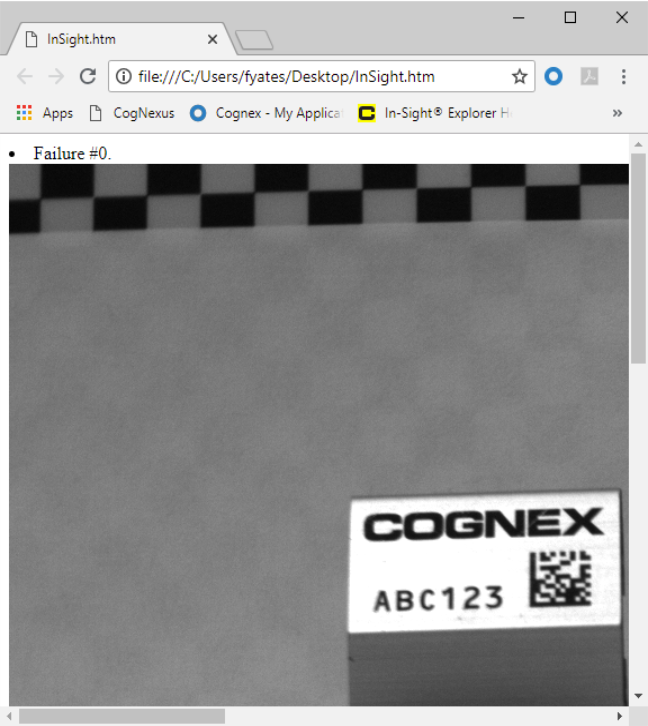
Whenever the spreadsheet updates after an image acquire, the function appends the text string in cell C2 to the end of the InSight.htm file on the host named FACTORYFLOOR-1. The User Name, "admin", and its password must already exist on FACTORYFLOOR-1 or #ERR will be returned in the spreadsheet. Within the HTML file, images are displayed along with a bulleted heading for each image. The first heading written would be "Failure #0.", the second "Failure #1.", and so on. Since the value for the Reset parameter of WriteImageFTP is Off, the first image file written would be InSight000.bmp, the second InSight001.bmp, and so on.
See Example 3
functions inserted into the spreadsheet

See a sample
output HTML file, viewed in Internet Explorer