External Light Connector
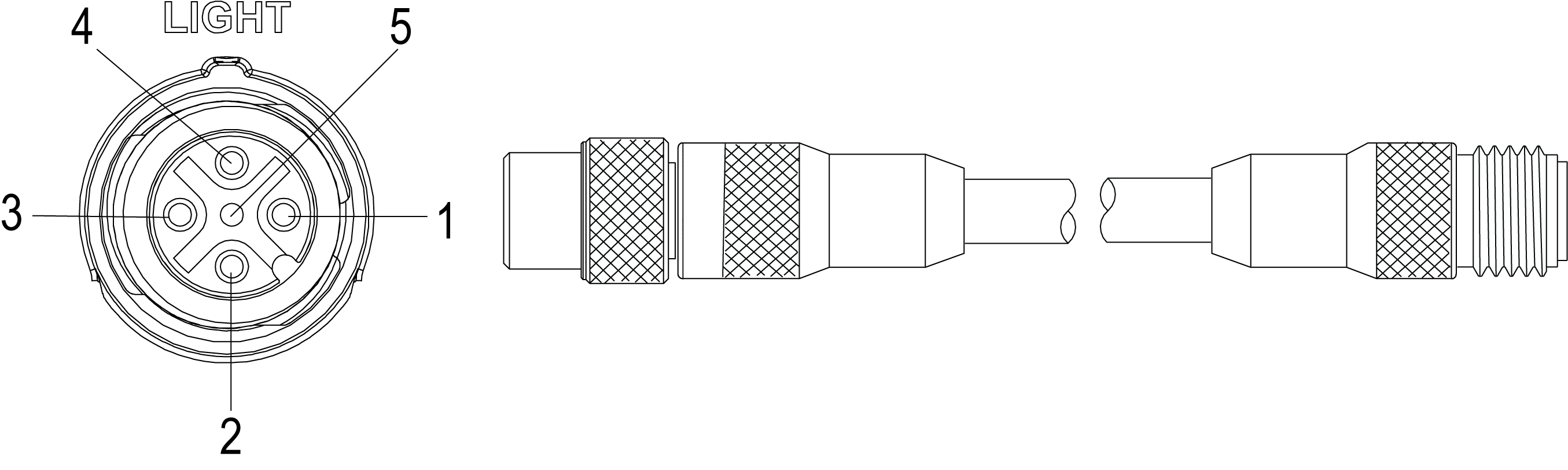
The vision system's LIGHT connector is used to connect the External Light cable to an external lighting device, providing power and strobe control. The External Light cable can be connected to either a continuous or strobed lighting device.
|
||
|---|---|---|
| Pin# | Signal Name | Wire Color |
| 1 | +24VDC | Brown |
| 2 | Intensity Control | White |
| 3 | GND | Blue |
| 4 | Strobe | Black |
| 5 | Chassis | Not Connected |
Note:
- Cables are sold separately.
- The External Light cables with the following product IDs do not support intensity control: CCB-M12LTF-xx, IVSL-M12-NSB-300, IVSL-M12-NSB-1000 and IVSL-M12-NSB-2000. If intensity control is required, use External Light cables with the following product IDs: IVSL‑5PM12‑J300, IVSL‑5PM12‑J500, IVSL‑5PM12‑J1000 and IVSL‑5PM12‑J2000.
- Current load: 750 mA maximum. Only the +24VDC pin is capable of sourcing 750mA.
- Intensity Control is an analog signal that ranges from 0 to +10VDC, and is configurable within In-Sight Explorer. It is a control signal only, and must not be used to power an external device. Power should be sourced from +24VDC and GND.
- The Strobe output is active low 0VDC and active high +12VDC, with the Polarity configurable within In-Sight Explorer. It is a control signal only and may not to be used for power. Power should be sourced from +24VDC and GND.