TrainPatMax3D
The TrainPatMax3D function is used to extract and train a 3D pattern in the point cloud. This pattern is then used with the FindPatMax3D function. The function returns a Model3D structure.
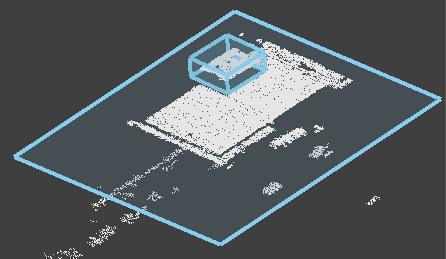
TrainPatMax3D Overview
The TrainPatMax3D function is used to extract and train a 3D pattern in the point cloud. This pattern is then used with the FindPatMax3D function.
TrainPatMax3D Inputs
The TrainPatMax3D function has the following syntax:
TrainPatMax3D(PointCloud, Fixture3D, ExternalFixture, Region3D, ExternalRegion, ExcludeBasePlane, Plane3D, ExternalPlane, PatternOrigin, PatMax3DVersion, FeatureSize, TrainEvent, Timeout, Show)
See the table for a description of the available parameters.
| Parameter | Description | ||||||||||||||||||
|
PointCloud |
Reference to a cell containing a point cloud. The default value is $A$0. |
||||||||||||||||||
|
Fixture3D |
Specifies the point cloud coordinate system in which the 3D fixture is defined. It is offset from the PointCloud origin in the following format with the following arguments: {X, Y, Z, Rotation, Tilt, TiltDirection}
Note: This parameter is only available if you set External Fixture to 0.
|
||||||||||||||||||
| External Fixture |
Specifies a reference to a Fixture3D structure defined in another cell. The function uses the referenced cell as the fixture of the function. Set to 0 (OFF) to use the internal fixture of the function instead. |
||||||||||||||||||
|
Region3D |
Specifies the dimensions, offset and angle for 3D region of interest (ROI) of the function. It is offset from the Fixture3D origin in the following format with the following arguments: {SizeX, SizeY, SizeZ, X, Y, Z, Rotation, Tilt, TiltDirection}
Note: This setting is only available if you set External Region to 0.
|
||||||||||||||||||
|
External Region |
Specifies a reference to 3D region defined in another cell. The function uses the referenced cell as the Region of Interest of the function. Set to 0 (OFF) to use the internal Box3D structure of the function as the ROI. |
||||||||||||||||||
| Exclude Base Plane |
When enabled, the function adds a separate planar region of interest (ROI), so that the surface plane can be excluded when training and/or finding a 3D pattern, improving the tool's performance. This setting is enabled by default, and Cognex recommends keeping it enabled if the pattern to train/find is a particular object. |
||||||||||||||||||
| Plane3D |
Specifies the offset and the angle of the plane to use. It is offset from the PointCloud origin in the following format with the following arguments: {X, Y, Z, Tilt, TiltDirection}
Note: This parameter is available only if External Plane is set to 0.
Note: This parameter is available only if Exclude Base Plane is True and External Plane is 0.
|
||||||||||||||||||
| External Plane |
Specifies a reference to a Rectangle3D or Circle3D structure defined in another cell to be used by the function. Set to 0 (OFF) to use the function's internal Plane3D structure instead. Note: This parameter is available only if Exclude Base Plane is True.
|
||||||||||||||||||
| Pattern Origin |
Specifies the X, Y and Z-axis location of the training pattern's origin, as offsets from the center of the training region.
|
||||||||||||||||||
| PatMax3D Version |
Note: The accuracy of the two versions is generally equal. However, there can be cases where one PatMax3D version produces a result, but the other does not.
|
||||||||||||||||||
| Feature Size |
Specifies the sampling quality of the point cloud points and patches that PatMax3D will use for alignment. The available values are the following:
Tip:
|
||||||||||||||||||
| Train Event | Trains the configured pattern upon clicking the button. | ||||||||||||||||||
| Timeout | Specifies a length of time (in milliseconds) to allow the training to run. The function execution stops if the time out exceeds the configured value. | ||||||||||||||||||
|
Show |
Selects the type of graphics to overlay on the image.
|
TrainPatMax3D Outputs
|
Returns |
A Model3D data structure containing the trained pattern, or #ERR if any of the input parameters are invalid. |
||||||||||||
|
Results |
When initially inserted into a cell, the following functions are automatically inserted into the spreadsheet to create a result table.
|
TrainPatMax3D Vision Data Access Functions
The following Models3D Vision Data Access Functions are automatically inserted into the spreadsheet to create the result table:
| Function | Description |
| GetOrigin(Model3D) | Returns the origin point of the model as a Point3D structure. |
| GetTrained(Model3D) | Checks if the referenced cell contains a successfully trained pattern or not. The function returns 1 if it does, and 0 if it does not. |
| GetX(Point3D) | Returns the X-axis coordinate of the model's origin point. |
| GetY(Point3D) | Returns the Y-axis coordinate of the model's origin point. |
| GetZ(Point3D) | Returns the Z-axis coordinate of the model's origin point. |