EditMaskedRegion Interactive Graphics Mode
EditMaskedRegions - Interactive Graphics Mode Interactive Graphics Mode
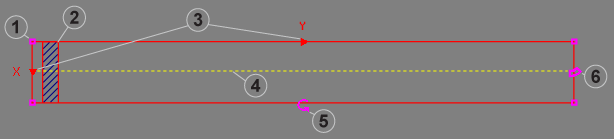
| Item | Controls | Description |
|---|---|---|
| 1 | Resizable Endpoint Boundary (x4) | Defines the four corners of the rectangular region. Click on an end-point boundary to resize the ROI from one of its corners. |
| 2 | Mask |
Defines the area of the image that will not undergo image analysis. The mask can be moved and resized within the ROI. A total of 99 masks may be added to a ROI. When a mask is added, it will be added to beginning of the ROI (if no other masks have been added), or behind the previously added mask. Note: Masks may not overlap. If they are configured to overlap, a 1 pixel buffer will automatically be inserted to prevent them from overlapping.
|
| 3 | Scan Direction Indicator (x2) | Defines which direction the ROI will scan for features. |
| 4 | Edge Detection Indicator | Defines the area within the ROI where edge transitions will be detected; also enables adding new masks to the ROI. |
| 5 | Rotation Handle | Allows the ROI to be rotated 360°. |
| 6 | Bend Handle | Allows the ROI to be bent into an arc or annular shape. |
EditMaskedRegions - Interactive Graphics Mode Mouse Actions
By placing the mouse cursor over various parts of the ROI, the mouse cursor will automatically transform, enabling the following actions:
| Mouse Icon | Description |
|---|---|

|
Allows you to drag the ROI anywhere within the image. |

|
Allows you to resize the ROI horizontally or vertically; also used to resize the mask. |

|
Allows two separate actions, depending on where the mouse cursor is placed. When the mouse cursor is placed on the Rotation Handle, you can rotate the ROI 360° from its current orientation. When the mouse cursor is placed on the Bend Handle, you can reshape the ROI into an arc or annular shape. |

|
Allows you to drag the mask within the ROI. |

|
Allows you to add or delete a mask from the ROI. When this icon appears, right-click the mouse to open a menu with two options: Add Mask or Delete Mask. |