Get Info
Returns the system information for the In-Sightvision system.
Get Info Inputs
Syntax: GI
Get Info Outputs
Returns a status code, followed by the system information.
The status codes are:
| Status Codes | Description |
|---|---|
| 1 | The command was executed successfully. |
| 0 | Unrecognized command. |
| -2 | The command could not be executed. |
The system information includes:
| Output | Description |
|---|---|
| Serial Number |
The serial number of the Vision System. |
|
Application Version |
The current firmware version on the Vision System. |
|
Monitor Version |
The Monitor version of the Vision System. The In-Sight Monitor is used mainly for troubleshooting the In-Sight sensor.
|
|
MAC Address |
The Media Access Control (MAC) address of the Vision System. |
|
Date of Build |
The date of build of the firmware on the Vision System. |
Get Info Example
To display system information about the In-Sightvision system, issue the following command: GI
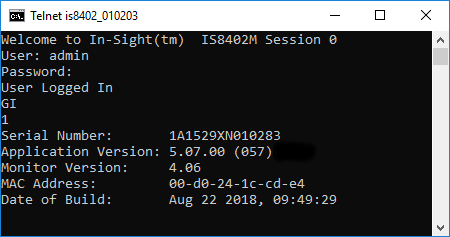
The In-Sightvision system initially responds with 1, indicating the command successfully executed. On the following lines, the system information is reported.