Get Job
Returns the ID of the active job on the In-Sight vision system.
Note:
- To use the job ID number feature, the job to be loaded must be saved with a numerical prefix of any positive integers.
- The active job must be saved with a numerical prefix before this command can be executed successfully. If the job has been dragged and dropped, the file name must have a numerical prefix before this command can be executed successfully.
Get Job Inputs
Syntax: GJ
Get Job Outputs
Returns a status code, followed by the integer ID of the active job. The status codes are:
| Status Codes | Description |
|---|---|
| 1 | The command was executed successfully. |
| 0 | Unrecognized command. |
| -2 | The active job has not been saved or does not have a numerical prefix, therefore the command could not be executed. |
Get Job Example
To return the ID for the active job, issue the following command: GJ
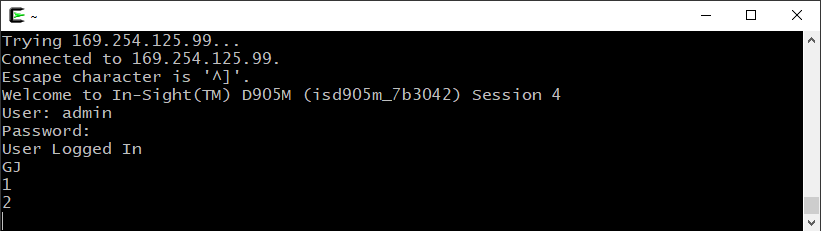
The In-Sight vision system responds with 1 to indicate that the command was executed successfully. The active job's name is "2.JOBX".