Managing Filmstrip
The Filmstrip allows you to:
 Playback prerecorded frames:
- Click on the Folder button to load the frames.
- Select the folder of the frames you want to use, then click OK.
-
When the frames loaded in, you can control the playback of your frames with the following buttons:
- Playback first frame
- Playback next frame
- Loop playback
- Stop
- Play First
- Play Previous
- Play Next
- Play Last
Record and playback frames:
- Click on the Record button. The icon starts to blink, indicating that it is ready for image acquisition.
- On the Menu Bar, click on Trigger. You can also use the Repeating Trigger button.
- Create as many frames as you need.
- When you are finished, click on the Record button again to stop recording.
Note: Now you can playback the frames you recorded.
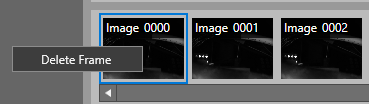
Delete frames:
- Select the frame or frames you want to delete.
- Right-click on the frame or frames and select Delete Frame.