Store File
Saves the current job
in the flash memory on the In-Sight vision system
-
If you check the Allow Online Job Save checkbox, users with Full or Protected access have permission to save jobs while Online. If you uncheck the Allow Online Job Save checkbox, the vision system have to be Offline to save jobs.
- To save the current job file, with the specified filename, to the vision system's RAMDisk folder, the syntax is: TFRAMDisk/[Filename]. For example, to save the file "Test.jobx" to the vision system's RAMDisk folder, issue the following command: "TFRAMDisk/Test.jobx".
- To save the current job file, with the specified file name, to the SD card folder of the vision system, the syntax is
- The Job Server Settings dialog is used to configure an FTP server that will host In-Sight job files for the In-Sight vision system, which allows another device, such as a PLC or robot controller via the LF and TF Native Mode commands, to change jobs without specifying a location.
Store File Inputs
Syntax: TF[Filename]
|
Parameter |
Description |
|---|---|
|
Filename |
The name of the job. The command executes with or without the JOBX extension. |
Store File Outputs
Returns a status code, followed by a line terminator. The status codes are:
| Status Codes | Description |
|---|---|
| 1 |
The command was executed successfully. |
| 0 |
Unrecognized command. |
| -1 |
The filename is missing. |
| -2 |
The job failed to save, the vision system is Online or the file was not found, therefore the command could not be executed. |
| -6 |
User does not have Full Access to execute the command. |
Store File Example
To name the current job "Test" and save it in flash memory on the In-Sight vision system, issue the following command:
TFTest.jobx
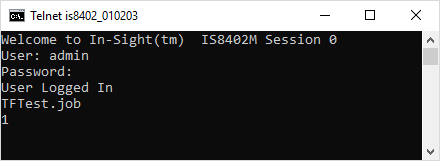
The In-Sight vision system responds with 1, indicating that the current job was successfully saved.