Read Job
Reads a job from the specified In-Sight job slot.
Read Job Inputs
Syntax: RJ[ID]
| Parameter | Description |
|---|---|
|
ID |
The job ID number (0 to 999). |
Read Job Outputs
Returns a status code, followed by a line terminator, followed by lines of job data.
The status codes are:
| Status Codes | Description |
|---|---|
| 1 |
The command was executed successfully. |
| 0 |
Unrecognized command. |
| -1 |
The job ID number is outside the allowed range (0 to 999). |
| -2 | The job could not be read, or the job slot is empty, therefore the command could not be executed. |
| -4 |
The In-Sight vision system is out of memory. |
| -6 |
User does not have Full Access to execute the command. |
The lines of job data are:
| Parameter | Description |
|---|---|
|
Name |
The first line contains the job name. |
|
Size |
The second line contains an integer value for the size (in bytes) of the job. |
|
Data |
The actual job data is encoded as ASCII hexadecimal values formatted to 80 characters per line. Each line ends with a terminating character. |
|
CheckSum |
The last line contains four ASCII hexadecimal bytes that are a checksum of the job data. |
Read Job Example
To receive information about the job named "85Test.jobx", which is saved on the In-Sight vision system, issue the following command: RJ85
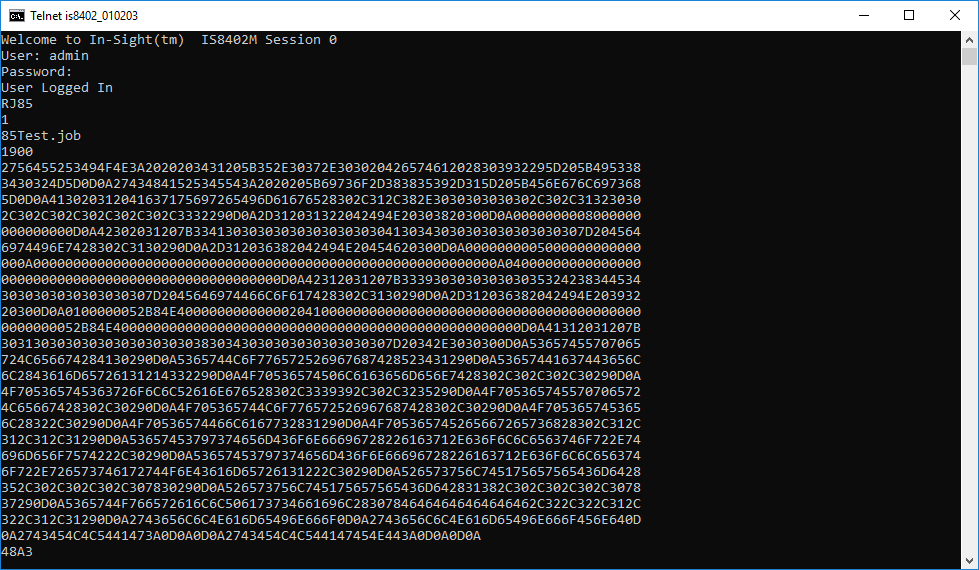
After issuing the Read Job command, the first line output to the telnet window is the status code (1), followed by the job name (85Test.jobx) and size (1900) in bytes, then the job data in ASCII hexadecimal format. Finally, the four-byte ASCII hexadecimal checksum is displayed on the last line (48A3).