Get FileList
Returns the number of files stored in memory, and the name of each file in memory on the In-Sight vision system.
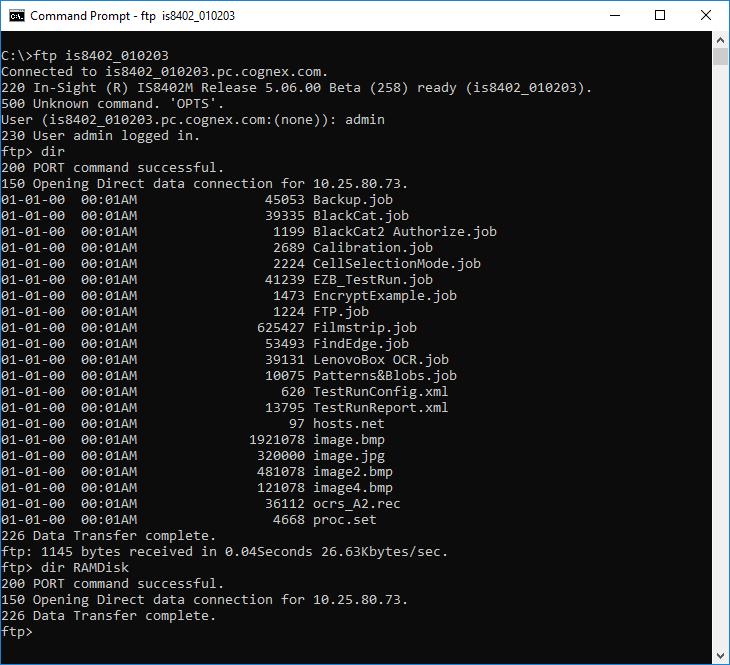
- If a RAM Disk folder is enabled on the vision system, the "RAMDisk" folder name is included in the Get Filelist output.
- It is not possible
to get the file list from a RAM Disk folder using the Get
Filelist Native Mode command. In order to obtain the file list
of a RAM Disk folder, use the
 FTP protocol
instead. Note that the CD (change directory) FTP command is not supported.
FTP protocol
instead. Note that the CD (change directory) FTP command is not supported.
Get FileList Inputs
Syntax: Get FileList
Get FileList Outputs
A status code, followed by the number of files stored in memory, followed by the name of each file in memory. The status codes are:
| Status Codes | Description |
|---|---|
| 1 |
The command was executed successfully. |
| 0 |
Unrecognized command. |
| -1 |
The input is invalid or has exceeded 15 bytes in length. |
| -2 |
The command could not be executed. |
Get FileList Example
To retrieve a count and list of files that are stored on the In-Sight vision system, issue the following command: Get FileList
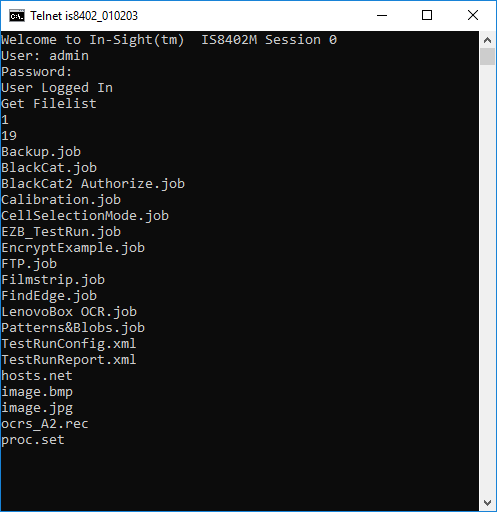
The vision system responds with a status code (1), followed by the number of files present in memory (13). Finally, the individual name of each file is displayed.