Set Event and Wait
Triggers a specified event and waits until the command is completed to return a response.
- The In-Sight vision system must be Online.
-
If the In-Sight vision system will be configured to accept an acquisition trigger from a PLC/Motion Controller via a Native Mode command, Cognex recommends that the SetEvent and Wait function be utilized, with the Event code set to 8 (SW8). This will ensure that the vision system waits for both the acquisition and inspection to be completed before sending a "complete" response back to the PLC/Motion Controller, and that previous inspection results are not being sent to the PLC/Motion Controller. The "complete" response from the vision system can also then be used to create conditional PLC logic that sends a read request for the inspection results.
Set Event and Wait Inputs
Syntax: SW[Int]
|
Parameter |
Description |
|---|---|
|
Int |
The Event code to set.
|
Set Event and Wait Outputs
Returns a status code. The status codes are:
| Status Codes | Description |
|---|---|
| 1 |
The command was executed successfully. |
| 0 |
Unrecognized command. |
| -1 |
The number is either out of range (0 to 8) or not an integer. |
| -2 |
The command could not be executed, or the sensor is Offline. |
| -6 |
User does not have Full Access to execute the command. |
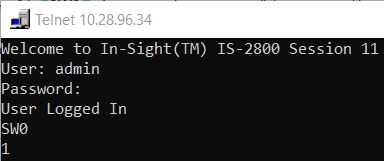
Set Event and Wait Example
The command to trigger External Event 0 is SW0. A response is not sent until the command has been completed.