Set Event
Triggers a specified event in the
If the In-Sight vision system will be configured to accept an acquisition trigger from a PLC/Motion Controller via a Native Mode command, Cognex recommends that the SetEvent and Wait function be utilized, with the Event code set to 8 (SW8). Ensuring that the vision system waits for both the acquisition and inspection to be completed before sending a "complete" response back to the PLC/Motion Controller, and that previous inspection results are not being sent to the PLC/Motion Controller. The "complete" response from the vision system can also then be used to create conditional PLC logic that sends a read request for the inspection results.
If the SetEvent function will be used by a PLC/Motion Controller to trigger an acquisition, it should only be used in circumstances where the inspection results are not also being read. Otherwise, the acquisition and inspection will not be synchronized, with the vision system returning a response as soon as the image is acquired and before the inspection has been completed.
Set Event Inputs
Syntax: SE[Int]
|
Parameter |
Description |
|---|---|
|
Int |
The Event code to set.
|
Set Event Outputs
| Status Codes | Description |
|---|---|
| 1 | The command was executed successfully. |
| 0 | Unrecognized command. |
| -1 | The number is either out of range (0 to 8) or not an integer. |
| -2 | The command could not be executed. |
| -6 | User does not have Full Access to execute the command. |
Set Event Example
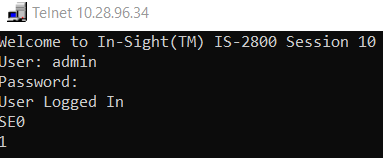
The SetEvent function may be used to trigger events in the
The command to trigger External Event 0 is: SE0
-
The spreadsheet looks like this: