Load File
Loads the specified job from flash memory on the In-Sight vision system.
The In-Sight vision system must be Offline.
Load File Inputs
Syntax: LF[Filename]
|
Input |
Description |
|---|---|
|
Filename |
The name of the job. The command will execute with or without the .JOBX extension. |
Load File Outputs
| Status Codes | Description |
|---|---|
| 1 |
The command was executed successfully. |
| 0 |
Unrecognized command. |
| -1 |
The filename is missing. |
| -2 |
The job failed to load, the vision system is Online, or the file was not found. |
| -4 |
The vision system is out of memory. |
| -6 |
User does not have Full Access to execute the command. |
Load File Example
To load "Product" as the active job on the In-Sight vision system, issue the following command: LF1job.jobx
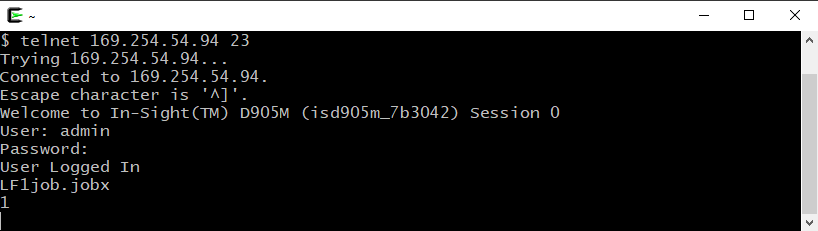
The In-Sight sensor responds with 1, indicating that the job was successfully loaded and made active.