WriteImage
Use the WriteImage function Functions are tools that are available in Spreadsheet for processing and analyzing acquisitions or other results. You can add functions to your Spreadsheet job to create tool chains and produce results for specific applications. to save the current image to a local device or an FTP, SFTP, or TCP server. Optionally, you can create an SVG file, which includes the overlay graphics on top of the image.
- You can save the file to the selected Storage location while Online or Offline.
- If you configure the job A job is a user-configured program in Spreadsheet consisting of functions and designed for specific applications. You can create and edit jobs using the Spreadsheet interface, and load them on a vision system for deployment in a live environment. to save a large number of image files, it is recommended that you select FTP Server or SFTP Server for the Storage setting. If you save a large number of image files on an In-Sight device (for example, if the Event parameter is set to
 Inputs
| Parameter | Description | |||||||||||||||||||
| Image |
Specifies a reference to a cell containing an Image data structure. The default reference is to the Image data structure in cell |
|||||||||||||||||||
| Event |
Specifies the event that forces an update. This parameter needs to be a reference to any event with a timestamp, for example, one of the following: Note: By default, the Event reference value is 0. If you do not change the default value, a button, labeled "Write", is automatically created and referenced when WriteImage is initially inserted into the spreadsheet.
|
|||||||||||||||||||
| Storage |
Specifies whether you want to save the image to a local device or a file server. The save location depends on the connected device and the Storage setting of the function.
|
|||||||||||||||||||
| Server |
Specifies the server name (or IP address) on the network where the image file is written. Note:
|
|||||||||||||||||||
| User Name |
Specifies a valid user name for the FTP/SFTP server. When this field is left blank, admin is used. Note:
|
|||||||||||||||||||
| Password |
Specifies the password for the FTP/SFTP server. The password is case-sensitive. If the FTP/SFTP server does not have a password, you can leave this field blank. Note:
|
|||||||||||||||||||
| Block Execution |
Specifies whether to block job execution until file transfer is complete. When disabled, the In-Sightvision system writes or transfers asynchronously. |
|||||||||||||||||||
| Timeout |
Specifies the time in milliseconds to block the execution. If the time to complete writing data to file or remote server exceeds this value, the tool returns #ERR to inform the job that the timeout was exceeded. Note: This option is only available if you enable the Block Execution parameter.
|
|||||||||||||||||||
| File Path |
Specifies the location where you want to save the file.
Tip: Depending on your FTP/SFTP server, a valid file path can contain forward slashes or back slashes. Make sure to use a file path convention that your file server accepts.
If you leave this field blank, you send the file to one of the following default locations:
Note:
This option is disabled when you select TCP Server as the Storage type. |
|||||||||||||||||||
| File Name |
Specifies the name of the image file; also defines the name of the .svg file. Note:
|
|||||||||||||||||||
| File Type |
Specifies the file format of the image.
|
|||||||||||||||||||
| Max Append Value |
The maximum number of unique image files that can be written using the specified File Name.The minimum value is 0, the maximum is 9999999, the default value is 999. A counter increments itself as each image file is written, and be added to the end of the specified File Name if no format specifier is used. Otherwise, the counter is added at the location of the format specifier. The counter automatically resets itself when it equals the Max Append Value. Existing image files on the target system is overwritten by new files of the same name. If the value is set to -1 or an out of range value, then no counter is appended to the File Name. Note:
This option is disabled when you select TCP Server as the Storage type. |
|||||||||||||||||||
| Reset |
Restarts the counter that is appended to the specified File Name to 0. After reset, the existing image files on the target location is overwritten by new files with the same name.
Note: By default, the Reset checkbox is not selected. If you don't change the default setting, a button, labeled Reset is automatically created and referenced when the WriteImage function is initially inserted into the spreadsheet.
Note:
This option is disabled when you select TCP Server as the Storage type. |
|||||||||||||||||||
| Overlay Graphics |
Specifies whether an .svg file with the overlay graphics is created. To view the .svg file and image file, open the .svg file with a Web browser that supports the .svg file type. The .svg file contains an internal link to the acquired image associated with it, and when the browser opens the .svg file, it follows the link to open and display the acquired image along with the overlay graphics.
Note:
|
Outputs
| Returns |
Note: An invalid FTP/SFTP server path or file name does not return an #ERR.
Tip:
If you hover over an #ERR, the following error message is displayed:
|
||||||
| Results |
When WriteImage is initially inserted into the spreadsheet, and if the Event and/or Reset parameters are in the default settings, the Write, Reset buttons are automatically created and referenced in the spreadsheet.
|

Format the File Name Parameter
You can format the File Name parameter so that the names are aligned, by using the '|' character. If a '|' is used, the value is either zero, or blank-filled. If the character immediately following a '|' is 0, the format is zero-filled; otherwise, it is blank-filled. The next character(s) indicate how many 0 or ' ' to insert. If the filename contains multiple ‘|’ characters, the last one is used as the format indicator. If the ‘|’ character is not followed by a digit, then the ‘|’ is used as part of the name, following the restrictions of any operating system.
If File Name is set to MyImage, the saved file names are the following:
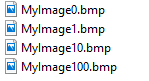
If File Name is set to MyImage|03, the saved file names are the following:
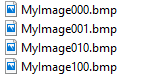
If File Name is set to MyImage|3, the saved file names are the following:
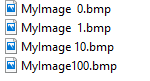
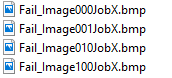
If the '|' is in the middle of the file name, the Append Value is inserted inline. For example, if File Name is set to Fail_Image|03JobX, the saved file names are the following:
TCP Message Format
The TCP message format contains a fixed header containing the image size, image type and file name. The header is followed by the image data described by the header.
| Section | Contents | Size | |||||||
| Header | Image Size | 4 bytes | |||||||
| Image Type |
4 bytes Valid values:
|
||||||||
| Image File Name |
128 bytes |
||||||||
| Body | Image Data | Variable |
The TCP server has to use the provided filename when saving image data to file when the SVG Graphics parameter is set to SVG Overlay. The metadata in the SVG requires the filename of the image for the SVG overlay to work correctly.
Sample TCP Server
"""
This code is provided as an example and is not guaranteed to be perfect. It is not intended for use in a production environment
without further testing and validation. The author and the organization they represent are not responsible for any issues
that may arise from using this code.
"""

import socket
import struct

# host machine IP address and port
server_ip = "<insert host ip>"
server_port = 4444

# Create a socket object
s = socket.socket(socket.AF_INET, socket.SOCK_STREAM)

# Bind the socket to a specific address and port
s.bind((server_ip, server_port))

# Start listening for incoming connections
s.listen(1)

print("Server is listening on port", server_port)

filesRecieved = 0

try:
    # Receive data from the client
    while True:
        # Accept a connection
        print("Waiting on connection...")
        c, addr = s.accept()
        print("Got connection from", addr)

        data = ""

        while True:
            # Read header
            data = c.recv(8 + 128)
            print("Recieved header length", len(data))
            if not data:
                print("Header not recieved, aborting read")
                break

            fileSize = 0
            fileSizeBuffer = data[:4]
            fileSize = struct.unpack("<I", fileSizeBuffer)[0]
            print("FileSize", fileSize)
            fileTypeBuffer = data[4:8]
            fileType = struct.unpack("<I", fileTypeBuffer)[0]
            print("FileType", fileType)
            fileNameBuffer = data[8:]
            fileName = struct.unpack("128s", fileNameBuffer)[0]
            print("FileName", fileName.decode())

            # Read data in 1024 packets

            recieved = 0
            while recieved < fileSize:
                readPacketSize = 1024
                if fileSize - recieved < 1024:
                    readPacketSize = fileSize - recieved
                data = c.recv(readPacketSize)
                recieved += len(data)

                if not data:
                    print("Got bad data packet aborting file read")
                    break

            # Save the file
            filesRecieved += 1
            print("Files Recieved", filesRecieved, "Last file size:", fileSize)
            print("")

except KeyboardInterrupt:
    print("\nExiting")