Typical Inspection Sequence
The Status block and Control block allow the Automation Controller to monitor the vision processing portion of the In-Sight vision system to determine when new results are available, and to request that the vision system queue any new results.
Inspection/Result Sequence
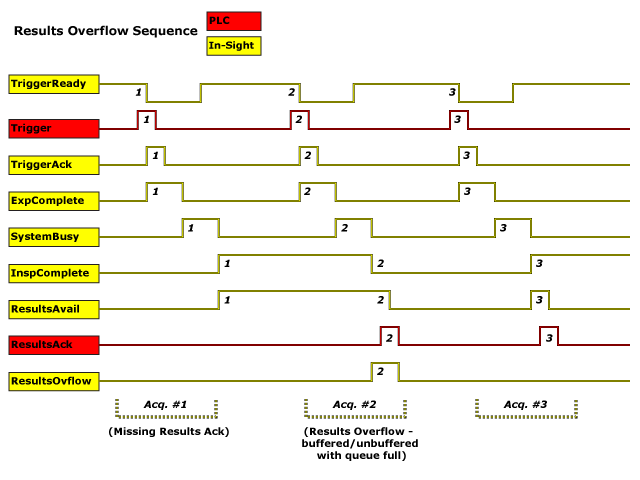
When an image is acquired by an In-Sight vision system, the image is placed in a queue for processing. While the vision system is processing the image, the System Busy bit is set. When the vision system has finished processing the image, the System Busy bit is cleared and the Inspection Completed bit is toggled.
The Buffer Results Enable bit determines how inspection results are handled by the vision system. If the Buffer Results Enable bit is set to False, then the inspection results are immediately placed into the Output Block and the Results Valid bit is set to True. If the Buffer Results Enable bit is set to True, the new results are queued. The earlier inspection results remain in the Output Block until they are acknowledged by the Automation Controller, which sets the Inspection Results Ack bit to True. After the Results Valid bit is cleared, the Automation Controller sets the Inspection Results Ack bit back to False to allow the queued results to be placed into the Output Block (this is a necessary handshake to ensure that the results are received by the Automation Controller).
Status Block Behavior
| Bit | Bit Name | Results If Buffering Is Disabled | Results If Buffering Is Enabled |
|---|---|---|---|
| 0 | System Busy |
Set when the vision system is running a job A job is a user-configured program in Spreadsheet consisting of functions and designed for specific applications. You can create and edit jobs using the Spreadsheet interface, and load them on a vision system for deployment in a live environment., loading a job or responding to user input. |
Set when the vision system is running a job, loading a job or responding to user input. |
| 1 | Inspection Complete |
Toggled on completion of an inspection. |
Toggled on completion of an inspection. |
| 2 | Results Buffer Overflow | Remains set to 0. | Set when the inspection results could not be queued because the Automation Controller failed to acknowledge the previous results, causing the results buffer to overflow. Cleared when an inspection result is successfully queued. |
| 3 | Results Valid |
Set when new results are placed in the Output Block. Stays set until the results are acknowledged by setting the Inspection Results Ack bit to True. |
Set when new results are placed in the Output Block. Stays set until the results are acknowledged by setting the Inspection Results Ack bit to True. |
Result Buffering
A queue for inspection results can be enabled. If enabled, this allows a finite number of inspection data results to be queued until the Automation Controller has time to read them. This is a useful feature for smoothing out data flows if different parts of the system (including the external Automation Controller) slow down for short periods of time.
In general, if inspections are occurring faster than the results can be sent out, the primary difference between buffering and not buffering is determining which results get discarded. If buffering is not enabled, the most recent results are kept, and the earlier result that the Automation Controller was unable to read is lost. Essentially, the most recent result simply overwrites the earlier result. If buffering is enabled (and the queue becomes full), the most recent results are discarded until room becomes available in the results queue.
 Example - Results Overflow Sequence