InspectEdgeWidth
Used to construct an edge model to perform advanced edge analysis on the edge pairs returned by an InspectEdge function. This data is used to detect edge pairs and analyze the distance between them.
InspectEdgeWidth Overview
After inserting the function into the spreadsheet, a reference must be made to an Inspect data structure output by an InspectEdge function. Once the reference to the InspectEdge function has been established, the edge model is created by configuring the parameters of the InspectEdgeWidth function. The edge model involves defining the following:
- The direction in which to detect edges.
- The type of edge transition - white to black or vice-versa.
- The edge scoring criteria that will be used to filter unwanted edges.
- The line fit criteria that will be used to filter unwanted edges from the line fit.
- The tolerances for width variances, defects and/or gaps to be encountered.
- The tolerances for position variances, if detecting a bead path.
Once the edge model has been established, the function will compare edge candidates against the edge model and report deviations from the model.
 Inputs
| Parameter | Description | ||||||||||||||||||||||||||||||||||||||||
|
InspectEdge |
Specifies a reference to a spreadsheet cell that contains a valid Inspect data structure returned by an InspectEdge function. |
||||||||||||||||||||||||||||||||||||||||
|
Find Edge Direction |
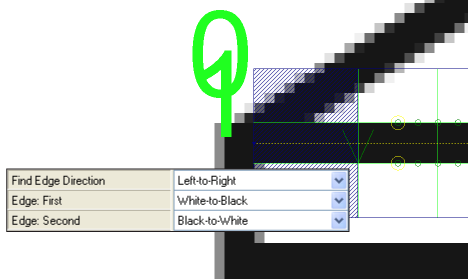
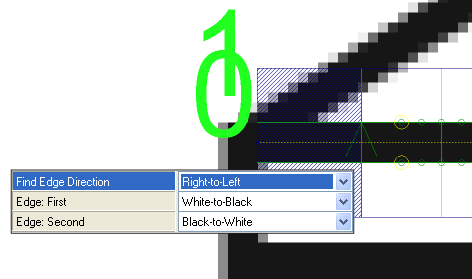
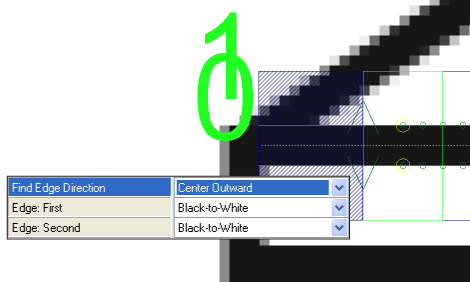
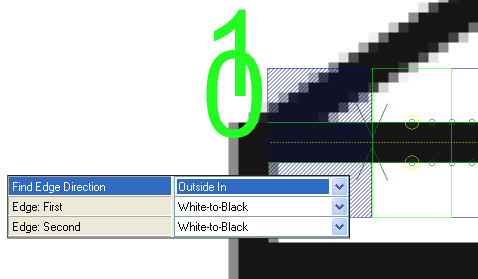
Specifies the direction in which the function attempts to detect edges. Dark green arrows are added to graphically illustrate the direction in which the edge is detected. Fit lines are labeled graphically within the image, with the first fit line labeled 0, and the second fit line 1. Note: If the region of interest (ROI) of the referenced InspectEdge function is bent into a curve, the inspection is relative to the center of the curve. When the Find Edge Direction parameter is set to Left-to-Right, it inspects towards the center of the curve, and when set to Right-to-Left, it inspects away from the center of the curve.
|
||||||||||||||||||||||||||||||||||||||||
|
Edge: First |
Specifies the contrast transition of the first edge to be detected, as determined by the Find Edge Direction parameter.
|
||||||||||||||||||||||||||||||||||||||||
|
Edge: Second |
Specifies the contrast transition of the second edge to be detected, as determined by the Find Edge Direction parameter.
|
||||||||||||||||||||||||||||||||||||||||
|
Edge Scoring |
Specifies the edge scoring mode used to determine whether or not an edge meets the established criteria.
|
||||||||||||||||||||||||||||||||||||||||
|
Advanced Filter |
Specifies how the function should construct the line fit.
|
||||||||||||||||||||||||||||||||||||||||
|
Max Number of Defects/ Gaps |
Specifies the maximum number of defects and gaps the function should expect to detect (1 to 4096; default = 5). This value is applied to Defects and Gaps individually. For example, when the setting is 5, the function expects to encounter a maximum of 5 Defects and 5 Gaps. This setting is used to construct the Vision Data Access Result Table in the spreadsheet. |
||||||||||||||||||||||||||||||||||||||||
|
Defects |
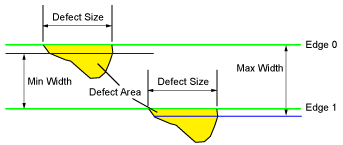
Specifies the parameters for determining defects in the edge from the line fit.
|
||||||||||||||||||||||||||||||||||||||||
|
Gaps |
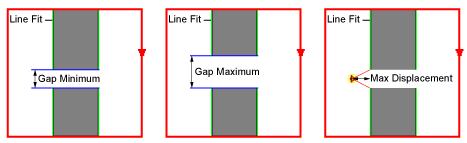
Specifies the parameters for determining gaps in the edge pairs.
|
||||||||||||||||||||||||||||||||||||||||
|
Position |
Specifies the parameters for determining positional defects in the edge pairs. The parameters define a defect as a deviation from the center of a model path, output by an InspectEdgeTrainBeadPath function. These parameters should only be used when referencing an InspectEdge function that is referencing an InspectEdgeTrainBeadPath function.
|
||||||||||||||||||||||||||||||||||||||||
|
Caliper Index |
Specifies the Caliper displayed on the image (the Caliper is outlined in green). The default Caliper displayed is 0. |
||||||||||||||||||||||||||||||||||||||||
|
Show |
Specifies the display mode for InspectEdgeWidth graphical overlays on top of the image.
|
 Outputs
|
Returns |
An Inspect data structure containing the detected defects, extremes and gaps, or #ERR if any of the input parameters are invalid. |
|
Results |
When InspectEdgeWidth is initially inserted into a cell, a results table is created in the spreadsheet. Note: If the value of the Max Number of Defects/Gaps parameter is greater than zero, InspectEdgeWidth will automatically insert a result table containing a maximum of 10 entries that correspond to the first 10 defects/gaps/edges/edge pairs in the data structure. If you wish to display more entries, you can expand the table by copying the last row and pasting additional rows at the end.
|
Vision Data Access functions
The following InspectEdge Vision Data Access functions are automatically inserted into the spreadsheet to create the data structure result table:
|
Label |
Function |
Description |
| Total Count | GetTotalCount(Inspect) | Returns the total number of results. |
| Defects/Gaps/Position | GetWidthCount(Inspect, Defects/Gaps/Position) | Returns the total number of specified defects or gaps (Defects = 0, Gaps = 1, Position = 2). |
| Defects/Gaps/Position | ||
| Size/Area/Width/Position | GetDefectGapValue(Inspect, Defect/Gap Index, Defect/Gap/Position, Edge Pair Index, Size/Area/Width) | Returns the size, area or width of the defect or gap (Defect = 0, Gap = 1, Position = 2; Size = 0, Area = 1, Width = 2). |
| X | GetDefectGapBoundsX(Inspect, Defect/Gap Index, Defect/Gap/Position, Edge Pair Index) | Returns the x-coordinate of the defect's bounding rectangle. |
| Y | GetDefectGapBoundsY(Inspect, Defect/Gap Index, Defect/Gap/Position, Edge Pair Index) | Returns the y-coordinate of the defect's bounding rectangle. |
| Height | GetDefectGapBoundsHeight(Inspect, Defect/Gap Index, Defect/Gap/Position, Edge Pair Index) | Returns the height of the defect's bounding rectangle. |
| Width | GetDefectGapBoundsWidth(Inspect, Defect/Gap Index, Defect/Gap/Position, Edge Pair Index) | Returns the width of the defect's bounding rectangle. |
| Angle | GetDefectGapBoundsAngle(Inspect, Defect/Gap Index, Defect/Gap/Position, Edge Pair Index) | Returns the angle of the defect's bounding rectangle. |
| Curve | GetDefectGapBoundsCurve(Inspect, Defect/Gap Index, Defect/Gap/Position, Edge Pair Index) | Returns the curve of the defect's bounding rectangle. |
| Start/End | GetDefectGapCaliperIndex(Inspect, Defect/Gap Index, Defect/Gap/Position, Edge Pair Index, Defect Start/End) | Returns the Caliper in which the defect starts or ends (Start = 0, End = 1). |
| Extremes - Furthest Point 1/2 | ||
| Caliper | GetExtremeWidth(Inspect, Thinnest/Thickest) | Returns the index of the Caliper which contains the specified extreme width (Thinnest = 0 and Thickest = 1). |
| Width | GetWidth(Inspect, Caliper Index) | Returns the width value of the edge within the indexed Caliper; returns 0 if no edges are found within the indexed Caliper. |
| X (Start and End) | GetEdgeX(Inspect, Caliper Index, Edge Pair Index or Edge Index) | Returns the x-coordinate of the referenced edge. |
| Y (Start and End) | GetEdgeY(Inspect, Caliper Index, Edge Pair Index or Edge Index) | Returns the y-coordinate of the referenced edge. |
- All of the formulas for the InspectEdgeWidth conform to the following:
- Inspect = An Inspect data structure output by an InspectEdgeWidth function
- Caliper Index = 0 to N (the total number of Calipers is equal to the number of Calipers output by the InspectEdge function that the InspectEdgeForDefect function is referencing)
- Edge Pair Index = 0 or 1
- Edge Index = 0 to N
- Point Index = 0 to 1
- If the Position Enabled parameter is ON, an additional section of InspectEdge Vision Data Access functions will be inserted into the Spreadsheet that relate to Position errors.