FindBlobs
FindBlobs is used to filter and score blobs in a Blobs structure by a weighted set of ideal values.
FindBlobs Overview
Using the FindBlobs parameter settings, a formula is created that calculates a score to measure how closely the blobs referenced in the Blobs data structure match an "ideal" blob. Based upon the parameter settings, FindBlobs returns only those blobs that match the specified requirements.
Each blob in the referenced Blobs data structure undergoes a two-step process of analysis. First, each of the individual FindBlobs parameter settings creates a formula that evaluates that particular parameter value. For instance, the Angle score would be computed by dividing the differences of the Range and the Angle value of the Angle parameter and the Range and the Angle value of the referenced blob, multiplied by the Weight value. After the individual scores have been computed, each of the individual parameter scores are added together and divided by the sum of the individual Weight parameter values. This score is then compared against the Accept Thresh value to determine whether or not the blob meets the specified requirements.
Once FindBlobs has filtered and sorted the extracted blobs, a new Blobs data structure and accompanying result table is automatically inserted into the spreadsheet. The result table is sorted by how closely the found blobs match the configured requirements, in descending order.
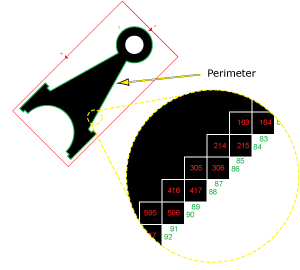
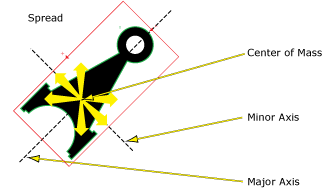
FindBlobs can be extremely useful in classifying features for defect detection. For example, if the job were to detect scratches on a surface, FindBlobs could be configured to return only those blobs with higher Elongation values. Or, if the goal was to detect jagged edge defects, FindBlobs could be configured to return only those blobs with higher Perimeter or Spread values.
 Inputs
| Parameter | Description | ||||||
|
Blobs |
This parameter uses Cell References to a Blobs data structure that is to be filtered and sorted. |
||||||
|
Number to Find |
This parameter specifies the maximum number (1 to 4096; default = 3) of blobs to return. If there are more blobs in the image whose scores exceed theAccept Threshsetting, the blobs with the highest scores will be selected. Note: If the value of the Number to Findparameter is greater than zero, FindBlobs will automatically insert a result table containing a maximum of 10 entries that correspond to the first 10 blobs in the Blobs data structure. If you wish to display more entries, you can expand the table by copying the last row and pasting additional rows at the end; make sure to increment the index number of any newly-pasted row so that the proper blob is indexed.
|
||||||
|
Accept Thresh |
Specifies the minimum acceptable match score (0 to 100; default = 10). FindBlobs will return only those blobs with match scores exceeding the Accept Thresh. The match score is computed with the following formula: (Angle score + Area score + Elongation score + Holes score + Perimeter score + Spread score) * (100/Sum of the parameters' Weight values) |
||||||
|
Angle |
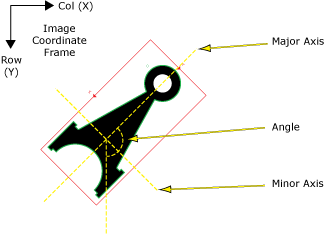
This parameter is used to configure the scoring formula that identifies the ideal Angle score (+/- CCW degrees) of found blobs. Angle Scoring Formula The FindBlobs Angle score is computed by using the following formula: Angle Score = [(Range + Angle) - BlobAngleVal]/Range * WeightVal BlobAngleVal = the referenced blob's output Angle value WeightVal = Weight/(sum of all weight values) * 100
|
||||||
|
Area |
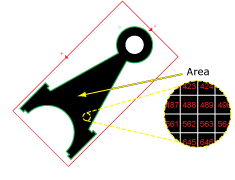
This parameter is used to configure the scoring formula that identifies the ideal Area score of found blobs. Area Scoring Formula The FindBlobs Area score is computed by using the following formulas, depending on the BlobAreaVal and the Area value:
|
||||||
|
Elongation |
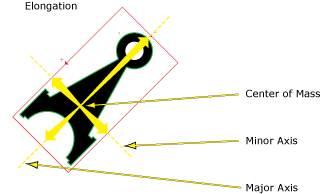
This parameter is used to configure the scoring formula that identifies the ideal Elongation score of found blobs. Elongation Scoring Formula The FindBlobs Elongation score is computed by using the following formula: Elongation Score = [(Range + Elongation) - BlobElongationVal]/Range * WeightVal BlobElongationVal = the referenced blob's output Elongation value WeightVal = Weight/(sum of all weight values) * 100
|
||||||
|
Holes |
This parameter is used to configure the scoring formula that identifies the ideal Holes score of found blobs. Holes Scoring Formula The FindBlobs Holes score is computed by using the following formula: Holes Score = [(Range + Number) - BlobHolesVal]/Range * Weight Val BlobHolesVal = the referenced blob's output Holes value WeightVal = Weight/(sum of all weight values) * 100
|
||||||
|
Perimeter |
This parameter is used to configure the scoring formula that identifies the ideal Perimeter score of found blobs. Perimeter Scoring Formula The FindBlobs Perimeter score is computed by using the following formula: Perimeter Score = [(Range + Perimeter) - BlobPerimeterVal]/Range * WeightVal BlobPerimeterVal = the referenced blob's output Perimeter value WeightVal = Weight/(sum of all weight values) * 100
|
||||||
|
Spread |
This parameter is used to configure the scoring formula that identifies the ideal Spread score of found blobs. Spread Scoring Formula The FindBlobs Spread score is computed by using the following formula: Spread Score = [(Range + Spread) - BlobSpreadVal]/Range * WeightVal BlobSpreadVal = the referenced blob's output Spread value WeightVal = Weight/(sum of all weight values) * 100
|
||||||
|
Show |
Specifies the display mode for FindBlobs graphical overlays on top of the image.
|
Outputs
|
Returns |
A Blobs data structure containing the matching blobs sorted by score, or #ERR if any of the input parameters are invalid. |
||||||||||||||||||||||||||||||||||||
|
Results |
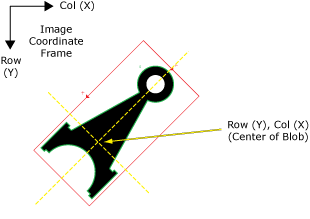
When FindBlobs is initially inserted into a cell, a results table is created in the spreadsheet using the following Blobs Vision Data Access functions. Note:
|
See the Blobs Vision Data Access functions for details on the result table.