OCRMax Vision Data Access functions
This topic lists the Vision Data Access functions that get values from an optical character reading OCRMaxstructure.
| Function | Description |
|---|---|
|
GetAngle(OCRMax, [Index]) |
Returns an angle value. |
|
GetChar(OCRMax, [Index1], [Index2]) |
Returns the character at the index. |
|
GetCharacterRegion(OCRMax, Char_Index, Show) |
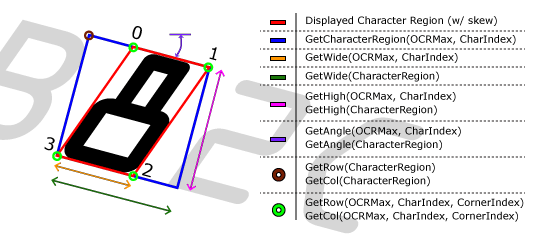
Returns a Region data structure for the indexed character. The region returned will be the smallest possible rectangular region that fully encompasses the character, as displayed in the graphic, below. If the characters being referenced do not undergo any skew (as the characters in the graphic below do), the displayed character region and the character rectangle will be the same. |
|
GetCharConfused(OCRMax, Char_Index*) |
When the optional Char_Index is specified, returns the confusion status of an indexed character. 1.0 if confused, otherwise 0.0. When a Char_Index is not specified, the function returns 1.0 if any of the characters within the string are in a confusion status, otherwise 0.0. |
|
GetCharFailedValidation(OCRMax, Char_Index*)
|
When the optional Char_Index is specified, returns the validation status of the indexed character. 1.0 if validation failed, otherwise 0.0. When a Char_Index is not specified, the function returns 1.0 if any of the characters within the string failed validation, otherwise 0.0. |
|
GetCharMisMatch(OCRMax, Char_Index*)
|
When the optional Char_Index is specified, returns the mismatch status of a character. 1.0 if characterized as a mismatch, otherwise 0.0. When a Char_Index is not specified, the function returns 1.0 if any of the characters within the string are mismatched, otherwise 0.0. |
|
GetCharacterRegion(OCRMax, Char_Index, Show) |
Returns a Region data structure for the indexed character. The region returned is the smallest possible rectangular region that fully encompasses the character, as displayed in the graphic below. If the characters being referenced do not undergo any skew (as the characters in the graphic below do), the displayed character region and the character rectangle is the same.
|
|
GetCharsTrained(OCRMax) |
Returns the trained characters, as a text string. |
|
GetFontName(OCRMax) |
Returns the name of the font in the referenced OCRMax function. |
|
GetHeight(CharacterRegion) |
Returns the height of the character rectangle. Note: The character rectangle height and the character region height are the same.
|
|
GetHeight(OCRMax, Char_Index) |
Returns the height of the character region. Note: The character rectangle height and the character region height are the same.
|
|
GetIgnoredCharacters(OCRMax) |
Returns the number of segmented characters that were ignored during fielding. |
|
GetInternalSettings(OCRMax) |
Returns the segmentation parameters from the referenced OCRMax function as a Settings data structure, which can be referenced by an External Settings parameter of other OCRMax function. However, the Auto-Tune Dialog is disabled, unless the following is done: To allow the Auto-Tune dialog to remain enabled while using the GetInternalSettings function, at least two OCRMax functions (OCRMax#1 and OCRMax#2) must be used. The first OCRMax function (OCRMax#1) needs to have the External Settings parameter set to 0, thus allowing the Auto-Tune functionality to remain enabled. Then a GetInternalSettings function needs to be used, referencing OCRMax#1. The second OCRMax function (OCRMax#2) needs to have the External Settings parameter reference the GetInternalSettings function. This allows OCRMax#1 to be auto-tuned, and the results are utilized by OCRMax#2. For example:
|
|
GetNumCharTrainedInstances(OCRMax, Character) |
Returns the number of trained instances of the character, for example "a" or "B" or "1". |
|
GetPassed(OCRMax, Char_Index) |
Returns the pass/fail status of the indexed character. If no Index parameter is specified, returns the pass/fail status of the entire string. The overall string passes only if all characters in the string pass. |
|
GetScore(OCRMax, Char_Index0, [Char_Index1]) |
Returns the match score between 0 to 100 for the indexed character. If the optional Index1 parameter is 1, returns the score of the second highest scoring character. |
|
GetSize(OCRMax, Char_Index) |
Returns the size of the indexed character in pixels. |
|
GetString(OCRMax) |
Returns the text string read by the referenced OCRMax function. |
|
GetWidth(CharacterRegion) |
Returns the width of the character rectangle. Note: If skew is present, the width is the character region plus the additional width required to compensate for the skew.
|
|
GetWidth(OCRMax, Char_Index) |
Returns the width of the character region. |
|
GetX(CharacterRegion) |
Returns X-coordinate of the character rectangle. |
|
GetX(OCRMax, Char_Index, Corner_Index) |
Returns the X-coordinate of the specified corner of a character region. |
|
GetY(CharacterRegion) |
Returns Y-coordinate of the character rectangle. |
|
GetY(OCRMax, Char_Index, Corner_Index) |
Returns the Y-coordinate of the specified corner of a displayed character region. Note: If the characters do not exhibit any skew, the character rectangle and the displayed character region are be the same.
|