Set Event and Wait
Triggers a specified event and waits until the execution of the command completes to return a response.
Note:
The In-Sight vision system must be Online.
Set Event and Wait Inputs
Syntax: SW<Int>
|
Parameter |
Description |
|---|---|
|
Int |
The Event code to set.
|
Set Event and Wait Outputs
Returns a status code. The status codes are:
| Status Codes | Description |
|---|---|
| 1 |
The command execution is successful. |
| 0 |
Unrecognized command. |
| -1 |
The number is either out of range (0 to 8) or not an integer. |
| -2 |
The command execution is unsuccessful, or the vision system is Offline. |
| -6 |
User does not have Full Access to execute the command. |
Set Event and Wait Example
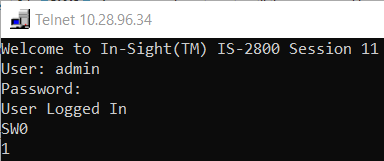
The command to trigger External Event 0 is: SW0
A response is not sent until the execution of the command completes.