Typical Acquisition Sequence
An In-Sight vision system can be triggered by directly manipulating the Trigger Enable and Trigger bits in the Control block while monitoring the Trigger Ready, Trigger Ack, and Missed Acq bits in the Status block.
On initial start-up, the Trigger Enable bit is False, and you must set to True to enable triggering. When the vision system is ready to accept triggers, the Trigger Ready bit is set to True.
While the Trigger Enable and Trigger Ready bits are True, each time the vision system sees the Trigger bit change from 0 to 1, an image acquisition is initiated. The Trigger bit must be held in the new state until that same state value has been seen in the Trigger Ack bit (which is a necessary handshake to guarantee that the change has been seen by the vision system).
During an acquisition, the Trigger Ready bit in the Status block gets cleared. The Exposure Complete bit is set at the end of the acquisition, and can only be cleared by the Clear Exposure Complete bit.
To force a reset of the trigger mechanism, set the Trigger Enable bit to False until the Status block is 0. Then the Trigger Enable bit can be set to True and acquisitions re-enabled.
 Example - Typical Acquisition Sequence
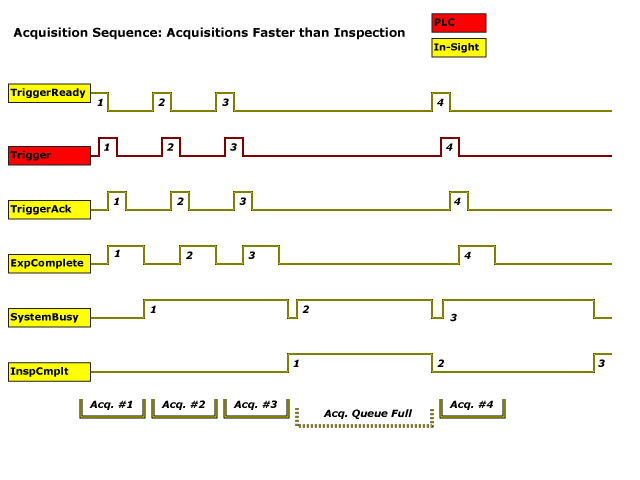
Example - Acquisition Faster Than Inspection Sequence