Script-Based Data Formatting
The DataMan Setup Tool allows you to have different data formatting combinations, and to have the reader perform different actions on the output channel, for example, beep, or have the LEDs blink, or pull output 1 up.
The script-based formatting has two main advantages:
- flexible result configuration
- configuring reader events before the result returns
Global JavaScript Functions
The DMCC functions fall to three categories:
- Commands, for example to issue a beep or a re-boot
- Setter functions for properties
- Getter functions for properties
The functions make use of the variable arguments feature of the script engine. The types of the function arguments are compared to the expected types defined by the DMCC commands. If the number of arguments or an argument type is incorrect an error status is returned.
The functions return an object with a property for the status. If a command returns a response it can be accessed by the response property. The status codes are the same as for the DMCC commands.
If a function executes successfully, a zero status value is returned. Script exceptions are not used.
To simplify the integration of DMCC commands in scripting, it is now possible to evaluate a DMCC command line as full command string. It is not required to split the DMCC command into the type correct command arguments.
- The data formatting script function is executed after the output delay time or distance elapsed.
- All scripting functions run in a separate thread and the execution is mutual exclusive. It is not possible that a script function is interrupted by another.
-
Use [0,1] or [true,false] instead of [ON|OFF] when scripting.
| DMCC | Description |
|---|---|
| dmccGet | Based on the DMCC implementation the response is always returned as a single string even for multi-value responses. |
| dmccSet | It supports multiple and type correct parameters. |
| dmccCommand | N/A |
| dmccSend | The functions evaluates a DMCC command. The return value contains the dmcc response type containing status and response string. The function requires one string argument. |
Example
| var foo = dmccGet(”DECODER.ROI”); |
The set command supports multiple and type correct parameters, for example:
| dmccSet(”DECODER.ROI”, 16, 1280, 16, 1024); |
Example
The following example uses the dmccSet functions to issue a beep signal, set the ftp server IP for image storage and adds the MAC to the output response:
|
function onResult (decodeResults, readerProperties, output) {
{
} var mac = dmccGet(”DEVICE.MAC-ADDRESS”);
myoutput = ’Result=”’ + decodeResults[0].content + ’”, MAC=’+mac.response; output.content = myoutput; } |
In case the DMCC set command for the IP address fails, a non-zero status will be returned, and a script exception will be thrown that is reported by the DataMan Setup Tool.
Example
To get the device name using the dmccGet function the correct string argument is required:
| var res = dmccGet(”DEVICE.NAME”); |
The dmccSend function can be used in a similar way, but without splitting the command and type correct arguments:
| var res = dmccSend(”GET DEVICE.NAME”); |
The return value is the same.
DMCC Support
The following DMCC commands are available for Script-Based Formatting:
| Command | Range | Description |
| GET/SET FORMAT.MODE | [0..1] |
Select formatting mode:
|
| SCRIPT.LOAD | length | Load the formatting script from the host to the reader. |
| SCRIPT.SEND | - | Send the formatting script from the reader to the host. |
Auxiliary Functions
The following auxiliary global functions are also available:
- function for decoding escape sequences
- function to encode a string argument into base64 encoding
Function decode_sequences
This global function is used to decode escape sequences. The function returns the string that contains the decoded escape sequence. The return value can be used to add keyboard control commands to a result transmitted over a HID connection.
| Parameter | Type | Description |
|---|---|---|
| encodedString | string | A string value that contains keyboard escape sequences. |
To simulate Alt-key, Ctrl-key, or Shift-key combinations, the following four escape sequences are available:
- \ALT- for <ALT-key> sequences
- \CTRL- for <CTRL-key> sequences
- \SHIFT- for <SHIFT-key> sequences
- \K for special keys
Supported Key Sequences and Keys
The following list contains the currently supported keys/key combinations:
- ALT-A to ALT-Z
- CTRL-A to CTRL-Z
- CTRL-F1 to CTRL-F12
- SHIFT-F1 to SHIFT-F12
- F1 to F12
- ALT-F1 to ALT-F12
- PageUp, PageDown, Home, End, Arrow (up, down, left, right), , Insert, Delete, Backspace, Tab, Esc, Print Screen, GUI (left, right) keys.
- The escape sequences for these are the following:
- PageUp -> \KPup;
- PageDown -> \KPdn;
- Home -> \KHome;
- End -> \KEnd;
- Up Arrow -> \KUar;
- Down Arrow -> \KDar;
- Left Arrow -> \KLar;
- Right Arrow -> \KRar;
- Insert -> \KIns;
- Delete -> \KDel;
- Backspace -> \KBksp;
- Tab -> \KTab;
- Esc -> \KEsc;
- Print Screen -> \KPrtScr;
- Left GUI -> \KLGui;
- Right GUI -> \KRGui;
Example
To pre- or post-pend a Ctrl-B keyboard control command, the following code example can be used:
|
var ctrl_b = decode_sequences("\\Ctrl-B;");
function onResult (decodeResults, readerProperties, output) {
} |
Function encode_base64
This global function is used to encode a string argument into base64 encoding. The encoded result is returned as a string object.
| Parameter | Type | Description |
|---|---|---|
| inputString | string | Input string to encode into base64. |
Error Management
Scripting errors may occur when the script is loaded or the code parser function is called. These errors are shown in the following locations:
- device log
- error box in Script-Based Formatting window
Formatting Script
When script-based formatting is enabled, a user-defined JavaScript module is responsible for data formatting. The parsing function, which defaults to onResult, is called with three objects as arguments holding the array of DecodeResult objects, ReaderProperties objects such as trigger mode or statistics, and the output object. There is only one entry point for both single and multicode results.
Class hierarchy is structured in the following way:
| function onResult [decodeResults, readerProperties, output] |
|
DecodeResult SymbologyProperties Point ValidationResult GS1Validation DoDValidation QualityMetrics Metric ReaderProperties Trigger Statistics |
|
Output Event |
See the detailed description of the related objects below.
Function onResult
This is the event handler for decode events, with zero, one or more decoded results.
| Property | Type | Description |
| decodeResults | DecodeResult[] | Input, an array of DecodeResult objects. One decode result will hold all information related to that decode attempt. |
| readerProperties | ReaderProperties | Input, the reader properties not tied to the actual decode result. |
| output | Output | Output, the object which needs to be updated to modify the output string or raise events. |
Function onGenerateFTPFilename
The name of the file to be sent to the FTP server can be generated with this function.
| Property | Type | Description |
| decodeResults | DecodeResult[] | Input, an array of DecodeResult objects. One decode result will hold all information related to that decode attempt. |
| readerProperties | ReaderProperties | Input, the reader properties not tied to the actual decode result. |
| output | Output | Output, the object which needs to be updated to modify the output string or raise events. |
The file name of the image to be uploaded is taken from the string return value of the script. For example:
|
function onGenerateFTPFilename(decodeResults, readerProperties, output) {
} function onGenerateFTPPCMReportFilename(decodeResults, readerProperties, output) {
} |
DecodeResult Object
The following tables list the details of the DecodeResult object, its types and properties.
Decode Result
Describes the details of one decoded result.
| Property | Type | Description |
| decoded | boolean | True if decoding was successful. |
| content | string | The (raw) read result. |
| decodeTime | integer | The decoding time in milliseconds. |
| triggerTime | integer | The trigger time in milliseconds. |
| timeout | string | The trigger timeout in milliseconds. |
| symbology | SymbologyProperties | The values of this property are listed in the Symbology Properties table below. |
| image | ImageProperties | The values of this property, also known as capture attributes, are listed in the Image Properties table below. |
| validation | ValidationResult | The values of this property are listed in the Validation Result table below. |
| metrics | QualityMetrics | The values of this property are listed in the Quality Metrics table below. |
| readSetup | integer | Used read setup index token. |
| source | string | The name of the device that decoded the image. |
| annotation | string | Result annotation for Multi-Reader Sync triggering. |
| label | string | Symbol label. |
| trucheck | TruCheckProperties | Outputs the TruCheck quality values for verification. The values of this property are listed in TruCheck Properties table listed below. |
Symbology Properties
Symbology properties for a decoded result.
| Property | Type | Description |
|---|---|---|
| name | string | The name of the symbology. |
| id | string | The symbology identifier (by ISO15424). |
| quality | integer | The overall quality metrics for the code, ranging in [0, 100]. For symbologies that use Reed-Solomon error correction (e.g. DataMatrix, QR Code, AztecCode, MaxiCode, DotCode, PDF417, certain 4-state postal codes), it reports the UEC (unused error correction). For linear symbologies, it indicates the overall quality of the code. The higher the number, the better the quality. |
| moduleSize | float | The module size. (The unit is pixel per module, ppm.) |
| size | point | The size of the symbol in columns x rows. If not applicable for the symbol, the values will be set to -1. |
| corners | array of Point |
This specifies the coordinates of the four corners. The details of the Point property type are listed in the Point table below. The corner coordinates are returned in the following order: For non-mirrored symbols,
except for non-mirrored DataMatrix and Vericode, where corner 0 is where the two solid lines of cells along two sides meet, and corners 1-3 follow counter clockwise. For mirrored symbols, the corners are mirrored correspondingly. |
| center | Point | This specifies the coordinates of the center. The details of the Point property type are listed in the Point table below. |
| angle | float | The code orientation in degrees. |
PtpTimeStamp
Peer to peer timestamp value on image acquisition.
| Property | Type | Description |
| s | integer | Image acquisition timestamp sec property. |
| ns | integer | Image acquisition timestamp nanosec property. |
Point
Point is the ordered pair of integer x- and y-coordinates that defines a point in a two-dimensional plane.
| Property | Type | Description |
| x | integer | This value specifies the x coordinate. |
| y | integer | This value specifies the y coordinate. |
ImageProperties Object
The following tables list the details of the ImageProperties object, its types and properties.
Image Properties
Properties of a captured image.
| Property | Type | Description |
|---|---|---|
| index | integer | The index of the image within the trigger. |
| FoV | Rect | The Field of View, the area of image sensor used relative to the top left sensor corner. The details of the Rect property type are listed in the Rect table below. |
| RoI | Rect | The Region of Interest, the part of the FoV that is actually used, relative to the sensor. The details of the Rect property type are listed in the Rect table below. |
| exposureTime | integer | The exposure time in microseconds. |
| gain | integer | The camera gain. |
| autoExposure | boolean | True if automatic exposure is used. |
| illEnabled | boolean | True if internal illumination is enabled. |
| illIntensity | integer | The internal illumination intensity. |
| extillEnabled | boolean | True if external illumination is enabled. |
| extillIntensity | integer | The external illumination intensity. |
| targetBrightness | integer | The target brightness in case of automatic exposure. |
| focusLength | integer | The focus value in millimeters. It is 0 if NA. |
| setupIndex | integer | The current index of read setup. |
| inputStates | array of boolean | The state of the input lines when the trigger was started. |
| filterTime | integer | The duration of filtering in milliseconds. |
| creationTime | integer | Creation time. |
| creationTicks | integer | Encoder ticks corresponding to image creation time. |
| ptpTimeStamp | ptpTimeStamp | PtP image acquisition timestamp. |
| id | integer | The numerical identifier of this image. |
Rect
Rect describes the width, height, and location of a rectangle.
| Property | Type | Description |
| top | integer | This specifies the top value relative to the top left sensor corner. |
| bottom | integer | This specifies the bottom value relative to the top left sensor corner. |
| left | integer | This specifies the left value relative to the top left sensor corner. |
| right | integer | This specifies the right value relative to the top left sensor corner. |
TruCheckMetric
A graded verification parameter that has a measurement associated with it.
| Property | Type | Description |
|---|---|---|
grade |
string | The grade of quality in a range from grade A to F, where A is the highest. |
raw |
float | The raw metric. |
numericGrade |
float | The continuous grade value as shown in ISO 15416:2016. |
TruCheckMetricGradeOnly
A graded verification parameter that has a measurement associated with it.
| Property | Type | Description |
|---|---|---|
grade |
string | The grade of quality in a range from grade A to F, where A is the highest. |
numericGrade |
float | The continuous grade value as shown in ISO 15416:2016. |
TruCheckApplicationStd
| Property | Type | Description |
|---|---|---|
grade |
string | The data title for each section of the parsed data. |
data |
string | The raw parsed data. |
check |
string | A Pass/Fail assessment determined by the specific application standard selected. |
TruCheckCodeword
| Property | Type | Description |
|---|---|---|
codeword |
integer | Outputs the codewords associated with the parsed data. |
isCorrected |
boolean | Returns a 0 if the codeword is not corrected using error correction; returns a 1 if the codeword is corrected using error correction. |
TruCheckEncodationAnalysis
| Property | Type | Description |
|---|---|---|
name |
string | Outputs the codeword for the parsed data. |
mode |
string | Outputs the encodation mode in effect. |
result |
string | Outputs the raw data decoded. |
TruCheckMetricGeneral
| Property | Type | Description |
|---|---|---|
contrastUniformity |
integer | The contrast uniformity value is the minimum modulation of any codeword according to ISO 15415. |
horizontalBWG |
integer | Print growth in the horizontal axis. |
MRD |
integer | Minimum difference between the brightest bar and the darkest space within the symbol. |
verticalBWG |
integer | Print growth in the vertical axis. |
xDimension |
float | The normal cell size spacing in mils (thousandths of an inch). |
TruCheckMetricModulation
| Property | Type | Description |
|---|---|---|
raw |
integer | Outputs the raw modulation values for each module. |
grade |
string | Outputs the letter grade (A-F) for each module. |
isBlack |
boolean | Outputs a 0 if the module is white or a 1 if the module is black. |
TruCheckMetricOverall
| Property | Type | Description |
|---|---|---|
aperture |
integer | The aperture in mils used to verify the symbol. |
applicationStandardName |
string | The application standard used to verify the symbol. |
applicationStandardPass |
string | The PASS or FAIL assessment of the symbol according to the application standard. |
gradeLetter |
string | The overall letter grade (A-F). |
gradeValue |
float | The overall numeric grade (0.0-4.0). |
gradingStandard |
string | The grading standard used to verify the symbol. |
lighting |
string | The lighting option selected for verification. |
wavelength |
integer | The wavelength used for verification in nm. |
TruCheckResult
Outputs the TruCheck values used for verification.
| Property | Type | Description |
|---|---|---|
alignmentPatterns |
TruCheckMetricGradeOnly | The grade values for the alignment pattern of a QR Code symbol. |
applicationStdArray |
TruCheckApplicationStd | An array of parsed data according to the selected application standard. |
applicationStdNotation |
string | The notes associated with the application standard data parsing. |
asciiArray |
array of integers | The ASCII values for the symbol. |
averageGrade |
TruCheckMetric | Data Matrix fixed pattern damage metric that averages multiple segments of its finder pattern. |
axialNonUniformity |
TruCheckMetric | The axial nonuniformity (ANU) which is the aspect ratio grade. |
batch |
string | The batch number, if parsed from the symbol data. |
bottomLSide |
TruCheckMetricGradeOnly | The grade for the bottom of the L-side of the symbol. |
bottomQuietZone |
TruCheckMetricGradeOnly | The grade for the bottom quiet zone. |
calibrationDate |
string | The last date of calibration. |
cellContrast |
TruCheckMetric | The cell contrast value according to AIM-DPM (ISO 29158). |
cellModulation |
TruCheckMetricGradeOnly | The cell modulation value according to AIM-DPM (ISO 29158). |
codewordArray |
The array of codeword values. | |
decode |
TruCheckMetricGradeOnly | The success or failure of the reference decode algorithm. |
distributedDamageGrade |
TruCheckMetric | The distributed damage grade parameter. |
encodationAnalysisArray |
TruCheckMetricGradeOnly | The array of encodation analysis values. |
fixedPatternDamage |
TruCheckMetric | The fixed pattern damage parameter according to ISO 29158 (AIM-DPM). |
formatInformationBlock |
TruCheckMetricGradeOnly | The grade for the format information block of a QR code. |
general |
A structure containing the general characteristic information. | |
gridNonUniformity |
TruCheckMetric | The grid nonuniformity (GNU) grade according to ISO 15415. |
horizontalClockTrack |
TruCheckMetricGradeOnly | The grade for the horizontal clock track. |
jpegImage |
string | The jpeg image of the symbol encoded as a base64 string. |
LeftLSide |
TruCheckMetricGradeOnly | The grade for the left L-side of the symbol. |
leftQuietZone |
TruCheckMetricGradeOnly | The grade for the left quiet zone of the symbol. |
linearDecodability |
TruCheckMetric | The decodability for linear (1D) symbols. |
linearDecode |
TruCheckMetricGradeOnly | The decode grade for linear (1D) symbols. |
linearDefect |
TruCheckMetric | The defect average value for linear (1D) symbols. |
linearEdge |
TruCheckMetric | The edge value for linear (1D) symbols. |
linearMinimumEdgeContrast |
TruCheckMetric | The minimum edge contrast (minEC) for linear (1D) symbols. |
linearMinimumReflectance |
TruCheckMetricGradeOnly | The minimum reflectance (minRefl) for linear (1D) symbols. |
linearModulation |
TruCheckMetric | The modulation (MOD) for linear (1D) symbols. |
linearQuietZone |
TruCheckMetric | The quiet zone value for linear (1D) symbols. |
linearSymbolContrast |
TruCheckMetric | The symbol contrast (SC) value for linear (1D) symbols. |
lowerLeftPattern |
TruCheckMetricGradeOnly | The value for the lower left pattern in QR code. |
minimumReflectance |
TruCheckMetric | The minimum reflectance (minRefl) value. |
Modulation |
TruCheckMetricGradeOnly | The modulation (MOD) value. |
modulationArray |
TruCheckMetricGradeOnly | The array of modulation values. |
overall |
All components of formal grade defined by a grading and/or application standard. | |
reflectanceMargin |
TruCheckMetricGradeOnly | The grade for the reflectance margin (RM). |
rightClockTrack |
TruCheckMetricGradeOnly | The grade for the right clock track (RCT). |
rightQuietZone |
TruCheckMetricGradeOnly | The grade for the right quiet zone (RQZ). |
rightTransitionRatio |
TruCheckMetric | The grade for the quiet zone value for linear symbols. |
symbolContrast |
TruCheckMetric | The grade for symbol contrast (SC) for 2D symbologies. |
topClockTrack |
TruCheckMetricGradeOnly | The grade for the top clock track (TCT). |
topQuietZone |
TruCheckMetricGradeOnly | The grade for the top quiet zone (TQZ). |
topTransitionRatio |
TruCheckMetric | The grade for the top transition ratio (TTR). |
UII |
string | The unique item identifier (UII) according to MIL-STD 130. |
unusedErrorCorrection |
TruCheckMetric | The grade for the unused error correction (UEC). |
upperLeftPattern |
TruCheckMetricGradeOnly | The grade for the upper left pattern (ULP). |
upperRightPattern |
TruCheckMetricGradeOnly | The grade for the upper right pattern (URP). |
versionInformationBlock |
TruCheckMetricGradeOnly | The version information block (VIB) value for QR Code. |
verticalClockTrack |
TruCheckMetricGradeOnly | The grade for the vertical clock track (VCT). |
ValidationResult Object
The following tables list the details of the ValidationResult object, its types and properties.
Validation Result
Describes all details of the validation.
| Property | Type | Description |
|---|---|---|
| state | integer |
These are the validation states:
The format of this property is “validation.state.notTried”. |
| method | integer |
These are the validation methods:
The format of this property is “validation.method.none”. |
| matchString | string | This property returns with the previously configured match string. Match string validation should be enabled for this. |
| failurePos | integer | The position of validation failure. |
| failureCode | integer | The validation failure code. |
| failureMsg | string | The error message describing the cause of validation failure. |
| gs1 | GS1 Validation | The details of the GS1 Validation property type are listed in the GS1 Validation table below. |
| dod_uid | DoD Validation | The details of the DoD Validation property type are listed in the DoD Validation table below. |
GS1Validation
GS1 validation details.
| Property | Type | Description |
| AI00 | string | Identification of a logistic unit (Serial Shipping Container Code) |
|
AI01 AI01 AI01 AI01 |
string string string string |
Identification of a fixed measure trade item (Global Trade Item Number) Identification of a variable measure trade item (GTIN) Identification of a variable measure trade item (GTIN) scanned at POS Identification of a variable measure trade item (GTIN) not scanned at POS |
|
AI02 AI02 |
string string |
Identification of fixed measure trade items contained in a logistic unit Identification of variable measure trade items contained in a logistic unit |
| AI10 | string | Batch or lot number |
| AI11 | string | Production date |
| AI12 | string | Due date for amount on payment slip |
| AI13 | string | Packaging date |
| AI15 | string | Best before date |
| AI16 | string | Sell by date |
| AI17 | string | Expiration date |
| AI20 | string | Product variant |
| AI21 | string | Serial number |
| AI240 | string | Additional product identification assigned by the manufacturer |
| AI241 | string | Customer part number |
| AI242 | string | Made-to-Order variation number |
| AI243 | string | Packaging component number |
| AI250 | string | Secondary serial number |
| AI251 | string | Reference to source entity |
| AI253 | string | Global Document Type Identifier |
| AI254 | string | GLN extension component |
| AI255 | string | Global Coupon Number (GCN) |
| AI30 | string | Variable count |
|
AI31nn AI32nn AI35nn AI36nn |
string | Trade measures |
|
AI33nn AI34nn AI35nn AI36nn |
string | Logistic measures |
| AI337n | string | Kilograms per square metre |
| AI37 | string | Count of trade items contained in a logistic unit |
| AI390n | string | Amount payable or coupon value - Single monetary area |
| AI391n | string | Amount payable and ISO currency code |
| AI392n | string | Amount payable for a variable measure trade item – Single monetary area |
| AI393n | string | Amount payable for a variable measure trade item and ISO currency code |
| AI394n | string | Percentage discount of a coupon |
| AI400 | string | Customer’s purchase order number |
| AI401 | string | Global Identification Number for Consignment (GINC) |
| AI402 | string | Global Shipment Identification Number (GSIN) |
| AI403 | string | Routing code |
| AI410 | string | Ship to - Deliver to Global Location Number |
| AI411 | string | Bill to - Invoice to Global Location Number |
| AI412 | string | Purchased from Global Location Number |
| AI413 | string | Ship for - Deliver for - Forward to Global Location Number |
| AI414 | string | Identification of a physical location - Global Location Number |
| AI415 | string | Global Location Number of the invoicing party |
| AI420 | string | Ship to - Deliver to postal code within a single postal authority |
| AI421 | string | Ship to - Deliver to postal code with three-digit ISO country code |
| AI422 | string | Country of origin of a trade item |
| AI423 | string | Country of initial processing |
| AI424 | string | Country of processing |
| AI425 | string | Country of disassembly |
| AI426 | string | Country covering full process chain |
| AI427 | string | Country subdivision of origin code for a trade item |
| AI7001 | string | NATO Stock Number (NSN) |
| AI7002 | string | UN/ECE meat carcasses and cuts classification |
| AI7003 | string | Expiration date and time |
| AI7004 | string | Active potency |
| AI7005 | string | Catch area |
| AI7006 | string | First freeze date |
| AI7007 | string | Harvest date |
| AI7008 | string | Species for fishery purposes |
| AI7009 | string | Fishing gear type |
| AI7010 | string | Production method |
| AI703s | string | Number of processor with three-digit ISO country code |
|
AI710 AI711 AI712 AI713 |
string | National Healthcare Reimbursement Number (NHRN): |
| AI8001 | string | Roll products - width, length, core diameter, direction, splices |
| AI8002 | string | Cellular mobile telephone identifier |
| AI8003 | string | Global Returnable Asset Identifier (GRAI) |
| AI8004 | string | Global Individual Asset Identifier (GIAI) |
| AI8005 | string | Price per unit of measure |
| AI8006 | string | Identification of the components of a trade item |
| AI8007 | string | International Bank Account Number (IBAN) |
| AI8008 | string | Date and time of production |
| AI8010 | string | Component / Part Identifier (CPID) |
| AI8011 | string | Component / Part Identifier serial number |
| AI8012 | string | Software version |
|
AI8017 AI8018 |
string | Global Service Relation Number (GSRN) |
| AI8019 | string | Service Relation Instance Number (SRIN) |
| AI8020 | string | Payment slip reference number |
| AI8110 | string | Coupon code identification for use in North America |
| AI8111 | string | Loyalty points of a coupon |
| AI8200 | string | Extended packaging URL |
| AI90 | string | Information mutually agreed between trading partners |
|
AI91-99 |
string | Company internal information |
DoD Validation
DoD validation details.
| Property | Type | Description |
| enterpriseID | string | The enterprise identifier. |
| serialNum | string | The serial number. |
| partNum | string | The part number. |
| uniqueItemID | string | The unique item identifier. |
| batchNum | string | The batch number. |
QualityMetrics Object
The following tables list the details of the QualityMetrics object, its types and properties. The details of the Metric property type are listed in the Metric table below. All the metrics listed are available for all the standards available under the Symbology Settings pane in the DataMan Setup Tool.
Quality Metrics
Describes the quality of all measured parameters.
| Property | Type | 1D Standards | 2D Standards | Description |
|---|---|---|---|---|
| singleScanInt | Metric | 1D Readability | The single-scan integrity, raw member is set to -1. Single-scan integrity is a general measure of the ease of decoding a barcode using only a single scan across it. This is meant to represent the way that simple decoders work. In general, such algorithms are not advanced and the decodability is lower if a symbol has damage in multiple locations in the barcode. A low singleScanInt metric may indicate many different problems, as it is a general measure of code quality. | |
| symbolContrast | Metric | 1D Readability, ISO/IEC 15416 | ISO/IEC 15415 (DataMatrix, QR, DotCode), SEMI T10 | The contrast of the symbol in ISO15415. Symbol contrast is a measure of the difference in grayscale value between the light and dark cells. A high contrast makes the code easier to decode, while a code with low contrast may not decode well due to difficulty separating the light and dark cells from each other. A poor contrast might indicate poor lighting, a code which is difficult to read due to similarities between the print and the background, or that a printer is performing poorly. |
| cellContrast | Metric | AIM/DPM ISO/IEC TR-29158 (DataMatrix, QR) | The contrast of the cell. Cell contrast is a measure of the difference in grayscale value between the light and dark parts of the cell. A high contrast makes the code easier to decode, while a code with low contrast may not decode well due to difficulty separating the light and dark areas of the cells. A poor contrast might indicate poor lighting, a code which is difficult to read due to similarities between marked and unmarked areas. |
|
| axialNonUniformity | Metric | ISO/IEC 15415 (DataMatrix, QR, DotCode), AIM/DPM ISO/IEC TR-29158 (DataMatrix, QR) | The axial non-uniformity. Axial non-uniformity is a measure of the difference in spacing of grid cells along each axis. In the best case, this value will be zero, indicating that centers of the grid cells are evenly spaced in all directions. A poor axial non-uniformity might indicate problems in the printing process for the code, which causes the code to appear stretched out or compressed. | |
| printGrowth | Metric | 1D Readability | ISO/IEC 15415 (DataMatrix, QR, DotCode), AIM/DPM ISO/IEC TR-29158 (DataMatrix, QR) | The print growth. Print growth is a measure of how completely a light or dark patch fills the cell allocated to it. High print growth means that a cell exceeds the boundaries allocated to it, while a low print growth indicates that the cells are not taking up all the available space. Either of these may cause problems (either by making adjacent cells difficult to read in the case of high growth, or making the cell itself difficult to read in the case of low growth). As a result, a print growth close to zero is desirable. A high or low print growth usually indicates problems with the printing process for a code. For instance, a dot peen marker may be wearing out and making smaller marks, or a printer may be depositing too much ink on a label and making the marks too large. |
| UEC | Metric | ISO/IEC 15415 (DataMatrix, QR, DotCode), AIM/DPM ISO/IEC TR-29158 (DataMatrix, QR), SEMI T10 | The unused error correction. Unused Error Correction measures the amount of Error Checking and Correction data that was printed into the code, but was unused. A high UEC count is good, as it means that little to no Error Correction data was needed to successfully read your code. A low UEC value may be due to poor printing, poor imaging, an incorrect code, or a damaged code. | |
| modulation | Metric | ISO/IEC 15416 | ISO/IEC 15415 (DataMatrix, QR), AIM/DPM ISO/IEC TR-29158 (DataMatrix, QR) | The modulation. Modulation measures how easily separable light cells are from dark cells in a code. Somewhat similar to contrast, higher modulation is better, and low modulation can lead to difficulty telling light cells from dark ones. Low modulation can indicate poor lighting, a code which is difficult to read due to similarities between the print and the background, or that a printer is performing poorly. |
| fixedPatternDamage | Metric | ISO/IEC 15415 (DataMatrix, QR), AIM/DPM ISO/IEC TR-29158 (DataMatrix, QR) | The fixed pattern damage. Fixed pattern damage is a measure of how much of the fixed patterns around the outside of the code (the solid finder patterns and the alternating clocking patterns) are intact. If the fixed patterns are damaged, then the code may be difficult to find at all, let alone decode. A poor fixed pattern damage score usually indicates a code which has been damaged or smudged, or it indicates a quiet zone violation. | |
| gridNonUniformity | Metric | ISO/IEC 15415 (DataMatrix, QR, DotCode), AIM/DPM ISO/IEC TR-29158 (DataMatrix, QR) | The grid non-uniformity. Grid non-uniformity measures the difference between the optimal placement of cells based on the overall grid and their actual placements. This is similar to the axial non-uniformity measurement, but instead of measuring a stretching or compressing of the whole grid, this measures how much the individual cells deviate from their expected positions. Poor grid non-uniformity usually indicates a printing process which is not consistent in its placement of the cells. | |
| extremeReflectance | Metric | ISO/IEC 15415 (DataMatrix, QR) | The extreme reflectance. This metric measures the brightness of the background on which the code is printed. A too high value might indicate lighting or imaging trouble that could lead to a code being washed out and difficult to read. A low value may indicate that not enough light is being applied to the code, and that contrast may be poor, leading to difficulty in reading. A poor extreme reflectance grade may also indicate trouble relating to the positioning of lights such as hotspots. | |
| reflectMin | Metric | 1D Readability, ISO/IEC 15416 | The reflectance minimum. This metric measures how dark the dark part of a barcode is. A low value indicates that the dark parts of the code are dark, and a high value indicates that they are not. A too low value may indicate that there is not enough light or too short exposure time is being used. A too high value might indicate a hotspot, too much light, or that a too high exposure time is being used. Print quality troubles, like a printer depositing less ink than intended, may also be indicated by the minimum reflectance grade. | |
| edgeContrastMin | Metric | 1D Readability, ISO/IEC 15416 | The edge contrast minimum measures the ratio of minimum edge contrast to the maximum contrast in the symbol. The metric is designed to pick up any artifacts in the symbol, such as a damaged bar, which generate low contrast variations in the symbol. A poor grade here might indicate poor focus in the optical system, poor lighting, or poor printing. | |
| multiScanInt | Metric | 1D Readability | The multi-scan integrity. Multi-scan integrity is a general measure of the ease of decoding a symbol by using multiple scans across the barcode. This metric is a way of measuring how advanced decoders might perform in decoding a particular barcode. A low multiScanInt metric may indicate many different problems, as it is a general measure of code quality. | |
| signalToNoiseRatio | Metric | SEMI T10 (DataMatrix) | Signal To Noise Ratio (SNR) is a relative measure of the Symbol Contrast to the maximum deviation in light or dark grayscale levels in the symbol (ie. noise). | |
| horizontalMarkGrowth | Metric | SEMI T10 (DataMatrix) | Horizontal Mark Growth is the tracking of the tendency to over or under mark the symbol, that is, a horizontal size comparison between the actual marked cells vs. their nominal size. | |
| verticalMarkGrowth | Metric | SEMI T10 (DataMatrix) | Vertical Mark Growth is the tracking of the tendency to over or under mark the symbol, that is, a vertical size comparison between the actual marked cells vs. their nominal size. | |
| dataMatrixCellWidth | Metric | SEMI T10 (DataMatrix) | Data Matrix Cell Width is the average width of each cell in the matrix (in pixels). | |
| dataMatrixCellHeight | Metric | SEMI T10 (DataMatrix) | Data Matrix Cell Height is the average height of each cell in the matrix (in pixels). | |
| horizontalMarkMisplacement | Metric | SEMI T10 (DataMatrix) | Horizontal Mark Misplacement is the average horizontal misplacement of Data Matrix marks from their optimal Data Matrix Cell Center Points. | |
| verticalMarkMisplacement | Metric | SEMI T10 (DataMatrix) | Vertical Mark Misplacement is the average vertical misplacement of Data Matrix marks from their optimal Data Matrix Cell Center Points. | |
| cellDefects | Metric | SEMI T10 (DataMatrix) | Cell Defects is the ratio of incorrect pixels to total pixels in the grid. | |
| finderPatternDefects | Metric | SEMI T10 (DataMatrix) | Finder Pattern Defects is the ratio of incorrect pixels to total pixels in the finder pattern. | |
| overallGrade | Metric | ISO/IEC 15416 | ISO/IEC 15415 (DataMatrix, QR), AIM/DPM ISO/IEC TR-29158 (DataMatrix, QR), SEMI T10 | Overall grade calculated from the individual metrics. |
| edgeDetermination | Metric | ISO/IEC 15416 | Edge Determination is the number of edges detected in the Scan Reflectance Profile. If the number of detected edges is greater than or equal to the expected number of edges, the grade is 4. Otherwise, the grade is 0. | |
| defects | Metric | ISO/IEC 15416 | Defects are irregularities in elements (bars and spaces) and quiet zones. The parameter is used to measure the ‘noise’ that results from unwanted dips and spikes in the Scan Reflectance Profile. The smaller the defect, the better the grade. | |
| referenceDecode | Metric | ISO/IEC 15416 | Reference Decode is an indication of whether the standard 2D Data Matrix algorithm was able to locate and decode this particular mark. This metric generates a grade of either A or F. | |
| decodability | Metric | ISO/IEC 15416 | Decodability is the measure of bar code printing accuracy in relation to the symbology-specific reference decode algorithm. Decodability indicates the scale of error in the width of the most deviant element in the symbol. The smaller the deviation, the higher the grade. | |
| contrastUniformity | Metric | ISO/IEC 15416 | ISO/IEC 15415 (DataMatrix, QR) | Contrast Uniformity is an optional parameter that is used for measuring localized contrast variations. It does not affect the overall grade. |
| reflectanceMargin | Metric | ISO/IEC 15416 | ISO/IEC 15415 (DataMatrix, QR) | Reflectance Margin measures how each module is distinguishable as light or dark compared to the global threshold. Factors (like print growth, certain optical characteristics of the substrate, uneven printing, encodation errors) can reduce or eliminate the margin for error between the reflectance of a module and the global threshold. A low Reflectance Margin can increase the probability of a module being incorrectly identified as dark or light. |
Metric
Describes the quality of a measured parameter.
| Property | Type | Description |
| raw | float | The raw metric. |
| grade | string | The grade of quality in a range from grade A to F, where A is the highest. |
Reader Properties
The following tables list the details of the reader properties.
ReaderProperties
Reader properties not tied to the actual decode result.
| Property | Type | Description |
|---|---|---|
| name | string | The name of the device that decoded the image. |
| trigger | Trigger | The details of Trigger property type are listed in the Trigger table below. |
| stats | Statistics | The details of the Statistics property type are listed in the Statistics table below. |
| inputstr | string | This property serves the same function as the <Input String> data formatting token in Standard Formatting: it holds the string that was sent to the reader via the InputString feature (only configurable through DMCC). |
Trigger
Describes the details of the initiating trigger event.
| Property | Type | Description |
| type | integer |
These are the available trigger types:
The format of this property is “trigger.type.single”. |
| index | integer | The unique trigger identifier. |
| burstLength | integer | The number of images in case of burst trigger. |
| interval | integer | The trigger interval in microseconds. |
| delayType | integer |
These are the available trigger delay types:
The format of this property is “trigger.delayType.none”. |
| startDelay | integer | The trigger start delay in milliseconds (when using Trigger.delayTime.time) or millimeters (when using Trigger.delayTime.distance). |
| endDelay | integer | The trigger end delay in milliseconds (when using Trigger.delayTime.time) or millimeters (when using Trigger.delayTime.distance). |
| creationTime | integer | Creation time. |
| creationTicks | integer | Encoder ticks corresponding to trigger signal time. |
| groupIndex | integer | The unique trigger identifier property of the reader which triggered the group. |
| endTime | integer | Trigger event end time (in ms). |
| endTicks | integer | Encoder tick counter at trigger end event time. |
Statistics
Operational information about the reader.
| Property | Type | Description |
|---|---|---|
| reads | integer | The total number of decoded symbols. |
| noReads | integer | The number of times the trigger was received but no symbol was decoded. |
| triggers | integer | The total number of triggers calculated by totalReads+totalNoReads+missedTriggers. |
| bufferOverflows | integer | The number of images that were not buffered because of image buffer full condition. |
| triggerOverruns | integer | The number of missed triggers because acquisition system was busy. |
| itemCount | integer | The number of no reads when buffered no read images are allowed. |
| passedValidations | integer | The number of reads that passed the data validation. |
| failedValidations | integer | The number of reads that failed the data validation. |
Output
Output describes the result and events after a decode. It is possible to specify different results for individual protocol targets. The output object has target-specific properties of type string. The name of the output property is the same as the target protocol name. If no target-specific output is assigned, the result falls back to the default result taken from the output.content property.
| Property | Type | Description |
| content | string | The string that is sent as decode result. |
| events | event | These are the output events that are activated. The details of the DecodeEvents property type are listed in the DecodeEvents table below. |
| SetupTool* | string | The string that is sent to the Setup Tool as decode result. |
| Serial* | string | The string that is sent to serial and USB connections as decode result. |
| Telnet* | string | The string that is sent to the Telnet connection as decode result. |
| Keyboard* | string | The string that is sent to the HID connection as decode result. Not available for 5.2. |
| FTP* | string | The string that is sent to the FTP connection as decode result. |
| PS2* | string | The string that is sent to the PS2 connection as decode result. Not available for 5.2. |
| NetworkClient* | string | The string that is sent to the NetworkClient connection as decode result. |
| IndustrialProtocols* | string | The string that is sent to the connected PLC as decode result. |
*These properties suppress the output information that was previously set via the output.content property.
An example for the protocol-specific formatting feature can be found here:
|
function onResult (decodeResults, readerProperties, output) {
} |
|
function onResult (decodeResults, readerProperties, output) {
} |
DecodeEvents
Describes the events to be emitted after a decode.
| Property | Type | Description |
| system | integer |
These are the system generated events:
|
| user1 | boolean | True if user event 1 is raised. |
| user2 | boolean | True if user event 2 is raised. |
* Only changing between good read and validation failure is supported.
Code Completion and Snippets
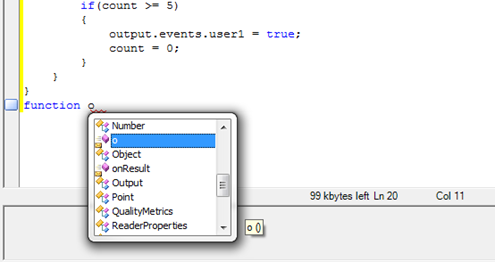
The script editor features automatic code completion, which shows pop-up messages with information regarding the code that is being written. Pop-up messages usually appear when typing special characters, for example period, opening or closing brackets, and so on. These messages can also be used manually with the Ctrl+Space key combination.
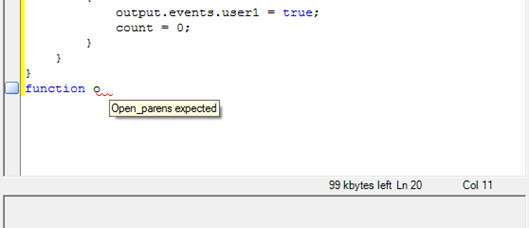
Code completion works in the following scenarios:
- complete a code fragment (Ctrl-Space)
- provide function list (Ctrl-Shift-Space)
The toolbar at the top of the editor collects the following actions available within the editor:
- Cut (Ctrl-x)
- Copy (Ctrl-c)
- Paste (Ctrl-v)
- Complete Word (Ctrl-k and then press w)
- Insert Snippet (Ctrl-k and then press x)
Snippets
The editor provides a selection of preset code fragments as examples. You can insert these snippets by right-clicking in the editor, using the toolbar or using the Ctrl-k and x key combination.