PROFINET
PROFINET is an application-level protocol used in industrial automation applications. This protocol uses standard Ethernet hardware and software to exchange I/O data, alarms, and diagnostics.
DataMan supports PROFINET I/O. This is one of the two “views” contained in the PROFINET communication standard. PROFINET I/O performs cyclic data transfers to exchange data with Programmable Logic Controllers (PLCs) over Ethernet. The second “view” in the standard, PROFINET Component Based Automation (CBA), is not supported.
By default, the DataMan has the PROFINET protocol disabled. The protocol can be enabled via DMCC, scanning a parameter code or in the DataMan Setup Tool.
DMCC
The following commands can be used to enable/disable PROFINET. The commands can be issued via RS-232 or Telnet connection.
Enable:
|
||>SET PROFINET.ENABLED ON ||>CONFIG.SAVE ||>REBOOT |
Disable:
|
||>SET PROFINET.ENABLED OFF ||>CONFIG.SAVE ||>REBOOT |
Reader Configuration Code
Scanning the following reader configuration codes enables/disables PROFINET for your corded reader.
Enable:  |
Disable:  |
Scanning the following reader configuration codes enables/disables PROFINET for your DataMan 8000 base station.
Enable:  |
Disable:  |
Setup Tool
In the Setup Tool's Communications application step's Ethernet tab, check PROFINET to enable this industrial protocol.
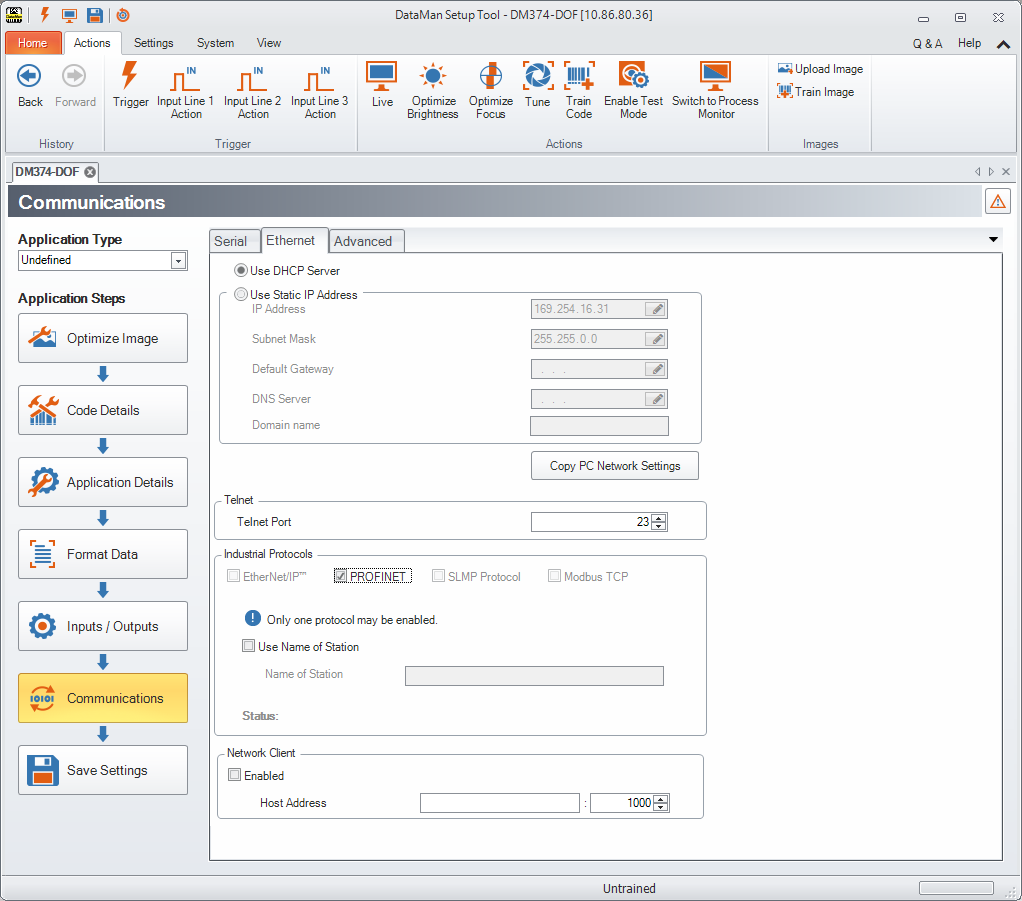
Make sure to save the new selection by clicking the Save Settings button in the upper toolbar before disconnecting from the reader.