SLMP Protocol
The SLMP Protocol uses standard Ethernet hardware and software to exchange I/O data, alarms, and diagnostics. It is Mitsubishi Electric’s publicly available, standardized communication format for communicating with Q, iQ and L Series PLCs through Ethernet or serial connections. DataMan supports SLMP Protocol on Ethernet only.
By default, the DataMan has SLMP Protocol disabled. The protocol can be enabled in the Setup Tool, via DMCC, or by scanning a configuration code.
DMCC
The following commands can be used to enable/disable SLMP Protocol. The commands can be issued via RS-232 or Telnet connection.
Enable:
|
||>SET SLMP-PROTOCOL.ENABLED ON ||>CONFIG.SAVE ||>REBOOT |
Disable:
|
||>SET SLMP-PROTOCOL.ENABLED OFF ||>CONFIG.SAVE ||>REBOOT |
Reader Configuration Code
Scanning the following reader configuration codes enables/disables SLMP Protocol for your corded reader.
Enable:  |
Disable:  |
Scanning the following reader configuration codes enables/disables SLMP protocol on your DataMan 8000 base station.
Enable:  |
Disable:  |
SLMP Protocol Scanner
SLMP Protocol on DataMan is implemented as a client type device also referred to as a scanner. The DataMan reader initiates all communication in the form of read and write requests. The PLC acts as a passive server reacting to the read and write requests. Since the PLC cannot initiate communication, it relies on the reader to periodically ask (scan) the PLC for any actions or information that the PLC requires, such as triggering or retrieving read results.
Getting Started
By default, SLMP Protocol is not enabled on the DataMan reader. The protocol must be enabled and the protocol configuration parameters must be set to correctly interact with a PLC. Protocol configuration is accomplished via the DataMan Setup Tool.
In the Setup Tool's Communications application step's Ethernet tab, check SLMP Protocol to enable this industrial protocol.
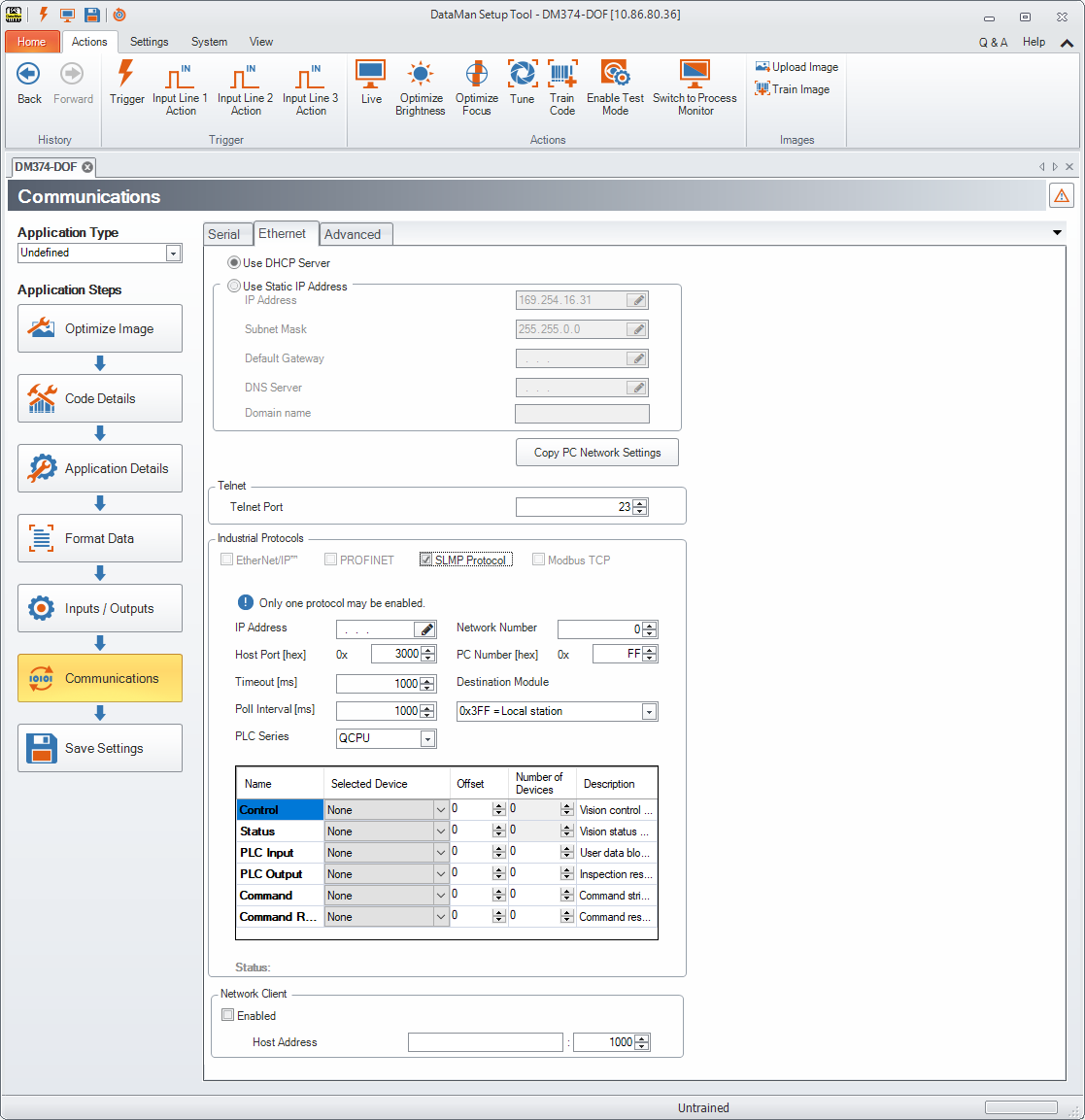
Make sure to save the new selection by clicking the Save Settings button in the upper toolbar before disconnecting from the reader.
SLMP Protocol configuration consists of two aspects: defining the network information and defining the data to be exchanged. All configuration parameters are accessed via the SLMP Protocol tab.
You must modify the IP Address to match the address of your PLC. In addition, modify Network Number, PC Number and Destination Module if they differ from your network.