Explicit Messaging
Unlike implicit messaging, explicit messages are sent to a specific device that always sends a reply to that message. As a result, explicit messages are better suited for operations that occur infrequently. Explicit messages can be used to read and write the attributes (data) of the ID Reader Object. They can also be used for acquiring images, sending DMCC commands and retrieving result data.
Issuing DMCC Commands
One of the more common explicit messages sent to a DataMan ID Reader is an instruction to execute a DMCC command. Explicit messages are sent from ControlLogix to a DataMan using MSG instructions. There are two different paths for invoking DMCC messages with explicit messaging: through the PCCC Object, or through the ID Reader Object “SendDMCC” service. The example shows the SendDMCC service.
The CIP STRING2 format is required for transmission across EtherNet/IP: a 16-bit length value followed by actual string characters, no null terminator. Logix stores strings in a slightly different format: a 32-bit length value followed by actual string characters, no null terminator. Therefore, some of the sample ladder involves converting to/from the two different string formats.
- Add the following tags to the ControlLogix Controller Tags dialog:
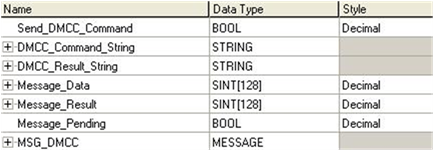
- Send_DMCC_Command: Boolean flag used to initiate the command.
- DMCC_Command_String: String containing the DMCC command to execute.
- DMCC_Result_String: String receiving the DMCC command results.
- Message_Data: Temp buffer holding the data to send via the MSG instruction.
- Message_Result: Temp buffer holding the data received via the MSG instruction.
- Message_Pending: Boolean flag used to indicate that a message is in process.
- MSG_DMCC: Data structure required by the Logix MSG instruction.
- Add the following two rungs to the MainRoutine of your ControlLogix project:
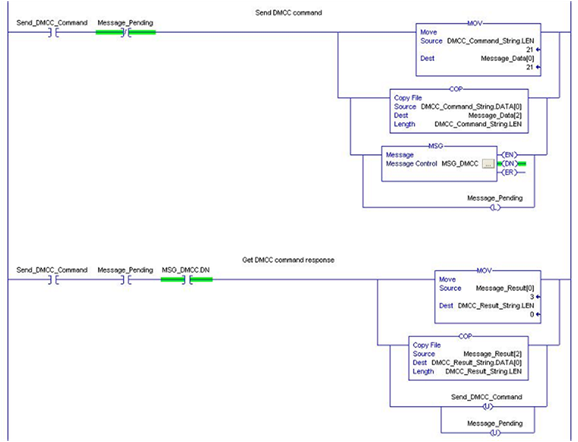
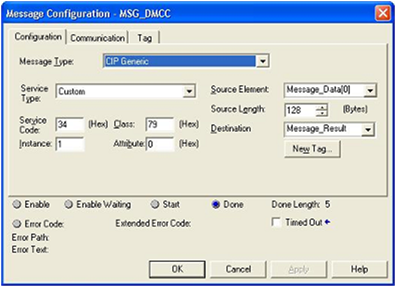
- Edit the MSG instruction. Configure it for “CIP Generic”, service 0x34 “SendDMCC”, class 0x79 “ID Reader Object” and instance 1. Set the source to “Message_Data” and the destination to “Message_Result”.
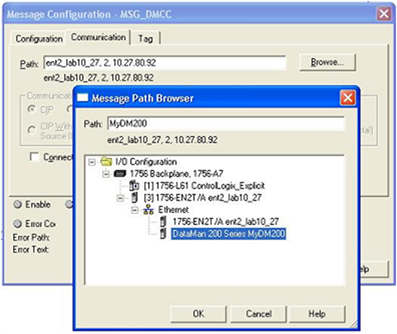
- On the MSG instruction Communication tab, browse for and select the DataMan which you added to the project I/O Configuration tree. This tells Logix where to send the explicit message.
- Download the project to the ControlLogix and place in “Run Mode”.
- Place a DMCC command in the “DMCC_Command_String” tag. For example “||>GET TRIGGER.TYPE$r$l”. Note the $r$l at the end of the string. This is how Logix represents a CRLF.
- Toggle the “Send_DMCC_Command” tag to 1.
- When the “Send_DMCC_Command” tag goes back to 0 execution is complete. The DMCC command results can be found in “DMCC_Result_String”.