Examples
Included with the DataMan Setup Tool installer is an example PLC program created with Mitsubishi (GX Works2) software. This program demonstrates the DataMan ID readers’ capabilities and proper operation. You can do the same operations by using more advanced features and efficient programming practices with Mitsubishi PLCs. For demonstration purposes, the sample program is used.
Function
The example application demonstrates the following operations:
- Triggering a read
- Getting read results
- Executing string commands (DMCC)
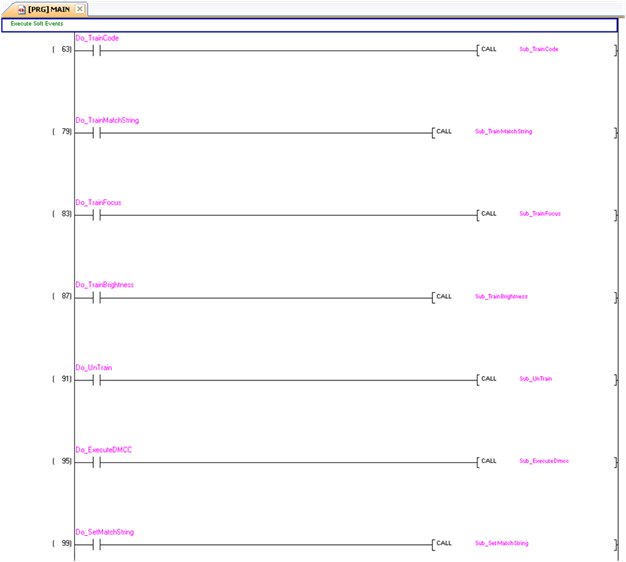
- Executing SoftEvent operations
- Train code
- Train match string
- Train focus
- Train brightness
- Un-train
- Execute DMCC
- Set match string
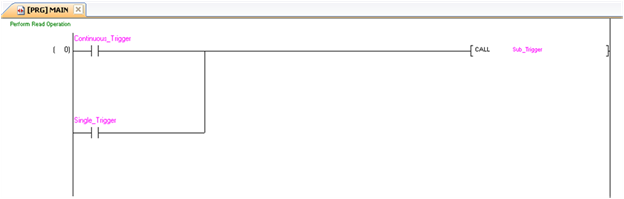
The “Main” program contains a PLC ladder rung to invoke each of these operations. The operation is invoked by toggling the control bit on the rung from 0 to 1. This invokes the associated subroutine to perform the operation. When the operation is complete, the subroutine sets the control bit back to 0.
Triggering a Read
The example provides two trigger options; “Continuous Trigger” and “Single Trigger”. As the name implies, enabling the “Continuous Trigger” bit will invoke a continuous series of read operations. Once enabled, the “Continuous Trigger” control bit will remain set until you disable it. The “Single Trigger” control bit invokes a single read operation. This control bit will automatically be cleared when the read is completed.
Primarily, the trigger subroutine manages the trigger handshake operation between the PLC and the reader. The control Trigger bit is set, the PLC waits for the corresponding TriggerAck status bit from the reader, and the control Trigger bit is reset. Refer to a description of handshaking in section Operation.
The trigger subroutine contains a delay timer. This is not required for operation. It exists simply to add an adjustable artificial delay between reads for demonstration purposes.
Getting Read Results
For this example the operation of triggering a read and getting read results were intentionally separated. This is to support the situation where the PLC is not the source of the read trigger. For example, the reader may be configured to use a hardware trigger. In such a case, only the get results subroutine would be needed.
Like the triggering subroutine, the get results subroutine manages the results handshake operation between the PLC and the reader. However, it also copies the result data to internal storage. The routine waits for the ResultsAvailable status bit to become active, it copies the result data to internal storage, and then executes the ResultsAck handshake. Refer to a description of handshaking in section Operation.
The read result consists of a ResultCode, ResultLength, and ResultData. Refer to section Output Data Block Field Descriptions for details of the ResultCode values. The ResultLength field indicates how many bytes of actual result data exist in the ResultData field. The subroutine converts this byte length to word length before copying the results to internal storage.
The get results subroutine gathers read statistics: number of good reads, number of no-reads, and so on. This is not required for operation. It is simply for demonstration purposes.
Execute String Commands (DMCC)
The string command feature provides a simple way to invoke DMCC commands from the PLC. The command format and command result format is exactly identical to that used for serial or Telnet DMCC operation.
This subroutine copies an example DMCC command (||>GET CAMERA.EXPOSURE) to the String Command block and then manages the string command handshake operation between the PLC and the reader to invoke the command and retrieve the command result. Any valid DMCC command may be invoked with this mechanism. Refer to the DataMan Command Reference document available through the Windows Start menu or the DataMan Setup Tool Help menu.
Execute SoftEvents
SoftEvents are used to invoke a predefined action. Each SoftEvent is essentially a virtual input signal. Each of the SoftEvent subroutines manages the handshake operation between the PLC and the reader to invoke the predefined action. The associated action is invoked when the SoftEvent bit toggles from 0 to 1. The subroutine then watches for the associated SoftEventAck bit from the reader which signals that the action is complete. For a description of handshaking, see section Operation.