Connecting the Encoder to a DataMan
Encoder is supported on the following DataMan devices and with the following conditions:
| DM50, DM60, DM70, DM150 | unidirectional | One input counts encoder ticks |
| DM260, DM300, DM503 | bidirectional |
• One input counts encoder ticks • Second input for direction information |
| DM360 | bidirectional | 2 inputs for quadrature modulated signals |
The DataMan 370 and DataMan 470 series readers are configurable to support all encoder modes listed above.
The encoder has four wires. The color coding of the wires is the following:
| Wire Color | Signal Name |
|---|---|
| Red | +24 VDC |
| Black | common- can be connected to either +24 VDC (NPN) or ground (PNP) |
| White | the output connected to the input line of the DataMan reader |
| Bare | ground |
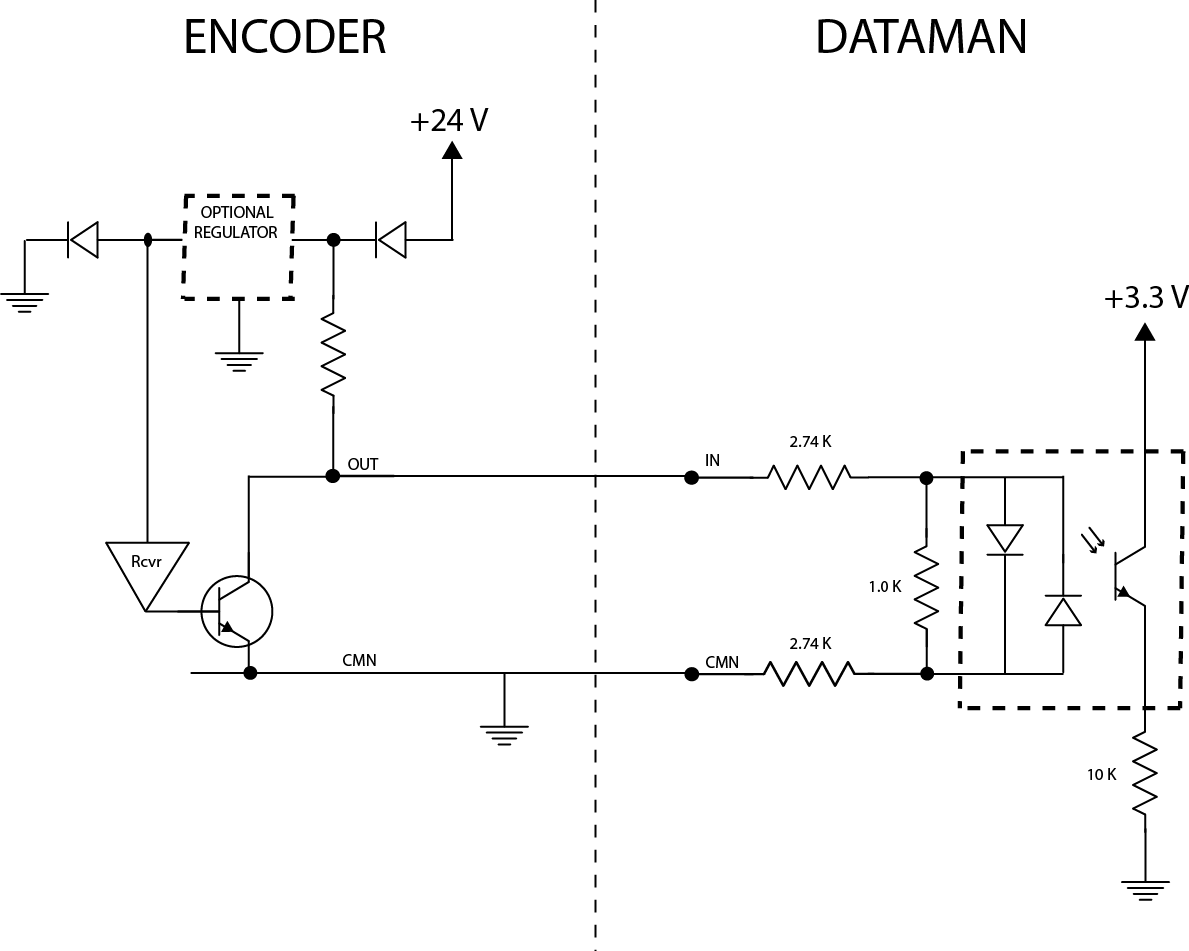
According to the speed of the line, set the number of pulses per revolution on the wheel by using the switches on the encoder (for more information, see the encoder documentation). The number of pulses, however, must not exceed 150 Hz, except for the DataMan 370 and DataMan 470 series readers, which support pulse frequency up to 50 kHz.
In the DataMan Setup Tool, configure the use of your DataMan reader with the encoder in the Pulse Encoder tab of the Inputs/Outputs pane.