Displaying 3D Images and 2D Tool Graphics
If Cognex Designer is running on a PC with a CPU that does not support the Advanced Vector Extensions 2 (AVX2) instruction set, then the 3D Tools of VisionPro cannot be used in the project. Cognex Designer indicates the lack of AVX2 support in its Output window with the following warning:
AVX2 instruction set is not supported on this machine: VisionPro 3D functionality will not be available.
Using any of the VisionPro 3D tools in the project if AVX2 is unsupported will result in project crashes or errors.
These topics cover how to construct a project that can be used to display 3D images output by a DS1000 Series Sensor, and the graphics output by the VisionPro 3D Tools.
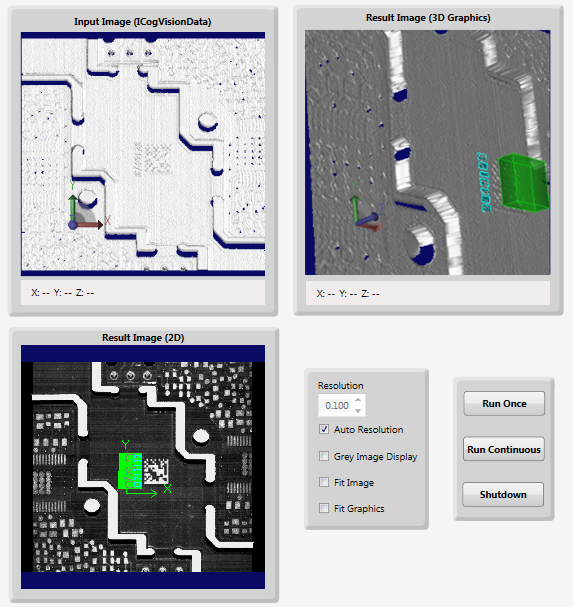
The Page below displays the Range Image acquired by the DS 1000 Series Sensor [Input Image (ICogVisionData)], the Range Image with the VisionPro Tool Block result graphics [Result Image (3D Graphics)], and the 2D graphics of the VisionPro Tool Block [Result Image (2D)].